

 TL;DR:
You can seamlessly add glasses to photos using AI-powered apps like Repairit for automated, professional-grade placement, or leverage AR applications like Snapchat and YouCam Makeup for real-time virtual try-ons.
● The Repairit App utilizes a "Text-to-Edit" prompt and the Nano Banana algorithm for precise facial analysis and auto-placement, whereas the Fotor online platform uses text prompts with Brush/Quick Select modes, and Glasses Camera (Android) relies entirely on manual sticker adjustments.
● Be aware of specific app limitations: Repairit adds an app logo watermark or border to free plan exports, YouCam Makeup locks advanced eyewear behind a premium subscription while displaying heavy ads, and Snapchat AR filters may misalign if the face is obstructed or poorly lit.
● To ensure the applied glasses look natural rather than digitally pasted, manually reduce the overlay's transparency to add authenticity, match the frame's lighting to the photo's existing shadows, and avoid overly bright or reflective lenses.
Ask AI for a summary
 ChatGPT
 Perplexity
 Gemini
 Claude
 Grok
Grok
Glasses now aren’t limited to improving vision, but they serve as a bold fashion statement. For a sophisticated professional vibe, a trendy modern style, or a funny appearance, the ability to add glasses to photo is immersive. A few adjustments, and you can experience different frames, shapes, and colors that align with your face.
Even a subtle change like this can completely transform a photo, turning a simple selfie into something more professional. To proceed, simply choose your glasses, make adjustments, and experiment with the top-rated apps and online options listed below.
Table of Contents
-
- Repairit App — Best AI Text-to-Edit Tool to Add Glasses to a Photo
- Snapchat – AR Glasses Filters for Fun Edits (Android/iOS)
- Fotor – Online AI Tool to Add Glasses to a Picture
- YouCam Makeup – Add Sunglasses to Photo with AI Stickers (Android/iOS)
- Glasses Camera - Free App to Add Glasses and Sunglasses (Android)
Part 1. The Benefits of Adding Glasses to a Photo with AI
When you add glasses to pictures with AI assistance, it integrates facial recognition algorithms to identify contours and expressions. This means no awkward overlaps, misaligned lenses, or unrealistic placements; just a natural, seamless look. For more clarity, adhere to the given use cases to understand where this functionality can be beneficial:
- For Social Media Makeover: Either it's a selfie or a profile picture, incorporating glasses allows you to experiment with different personalities. AI ensures every frame aligns with your facial features, helping you create images that are trendy and attention-grabbing.
- Virtual Eye-Wear Try-Ons: Instead of going for direct purchase, try different styles of glasses virtually to see which shapes suit you. It makes online shopping easier and more accurate, helping you confidently choose frames without stepping into a store.
- To Elevate Professional Headshots: Glasses can immensely improve your professional images, conveying intelligence and confidence together. When you add them digitally with AI, you can ensure a sophisticated look for LinkedIn profiles or corporate presentations.
- Experience Creative and Fun Edits: Beyond practical use, AI makes it easy to play with styles, perfect for trendy content creation. Experiments with oversized frames, colored lenses, or different shades add more personality to your photos.
Part 2. Key Features to Look for in an AI App to Add Glasses to a Photo
To dive into AI-powered photo edits, preferring the right app to add glasses to photo can make the image appear natural. With countless options available, knowledge about what features matter can save time and help in quality edits:
- Advanced Facial Recognition: A professional app should utilize AI techniques to detect facial contours, expressions, and different angles. This guarantees the glasses are perfectly suited, giving a realistic look without awkward overlaps or distortions.
- Massive Collection of Glasses: The app or online tool should have a diverse range of frames, shapes, and colors to choose from. Options like classic, professional, and trendy allow you to experiment or find the perfect match for your personality.
- Features for Customizations: Even with AI precision, the ability to fine-tune the size and position of the glasses gives you complete control. The customization options help achieve a perfect fit and make the glasses appear naturally integrated into your photo.
- On the Go Preview Option: With the ability to preview, you can analyze how different glasses look on your face. This makes the experiment fast, enabling you to compare styles and settle on the best-suited one.
- Deliver High-Quality Outputs: The app you choose should maintain the photo's resolution and quality, making AI edits appear professional. It ensures that your generated result is appropriate for social media, professional profiles, and personal keepsakes.
Part 3. Best AI Apps to Add Glasses to a Photo in 2025
The demand for creativity has led to many apps and online tools that add glasses to photo using AI, ensuring precise placement. Providing immersive possibilities, here are the top apps that will help you try multiple frames all without physical hassle:
1. Repairit App — Best AI Text-to-Edit Tool to Add Glasses to a Photo
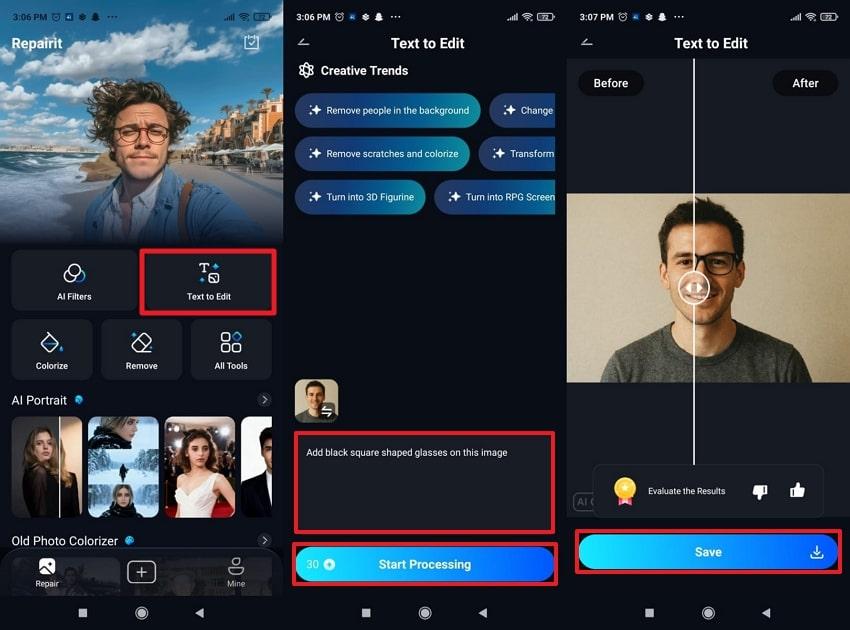
Among the best competitors, Repairit App remains notable due to its AI-driven capabilities, including the Text-to-Edit feature. All you need to do is type a simple instruction, such as “add glasses,” and the AI will start processing immediately. The AI identifies facial structure, detects eye placement, and adapts the glasses placement, ensuring correct positioning. Edits are performed quickly, with no layers, masks, or menus required for the process to proceed.
Essentially, real-time previews and one-click processing allow users to verify edits before saving, helping with accuracy. Besides this, you can save your images with glasses directly to your gallery once the process completes. Moreover, the newly integrated Nano Banana algorithm further enhances user performance and outcomes. After you apply, you’re presented with a custom repair request where you can specify the element to repair.
Step-by-Step Guide to Add Glasses to Photos via the Repairit App
- Access the “Text-to-Edit” features, insert your image, and type a detailed prompt, defining your glasses style.
- Next, press the “Start Processing” button to generate and compare results afterward.
- Once done previewing, hit the “Save” button to download the image to your gallery.
2. Snapchat – AR Glasses Filters for Fun Edits (Android/iOS)
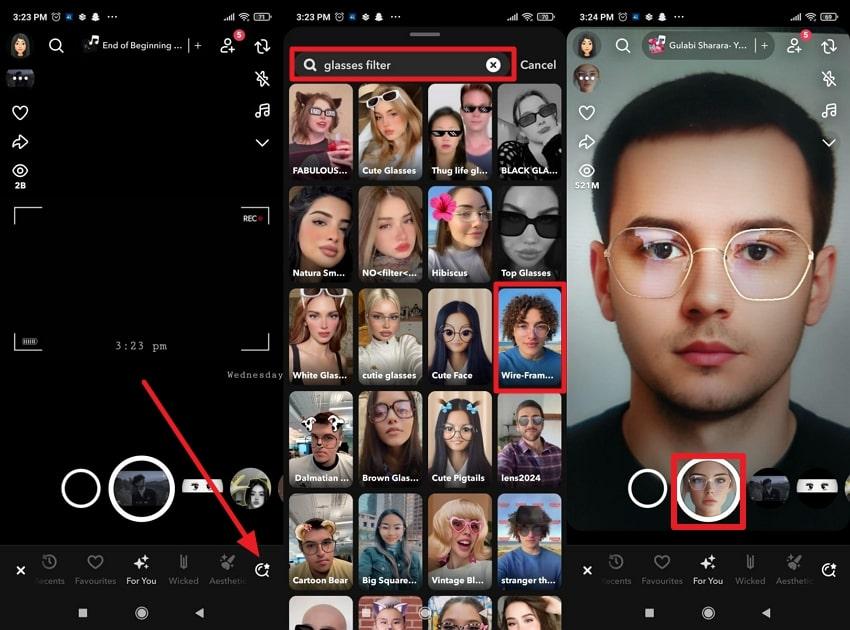
Snapchat opens an instant camera, enabling users to add glasses to a picture with numerous AR filter options. The app leverages facial recognition, ensuring that incorporated glasses move naturally with the user's head or expression. You can further personalize or combine effects, save edits, or share instantly with friends. Community-created lenses and daily new releases mean you have a wide range of glasses designs to explore.
Guidelines for Applying Glasses to Photos Using Snapchat
- Open Snapchat, tap the “Search” icon, and look for the glasses filter in the search bar.
- From the search results, choose a filter, and press the “Camera” button to capture your image in the applied glasses filter.
3. Fotor – Online AI Tool to Add Glasses to a Picture
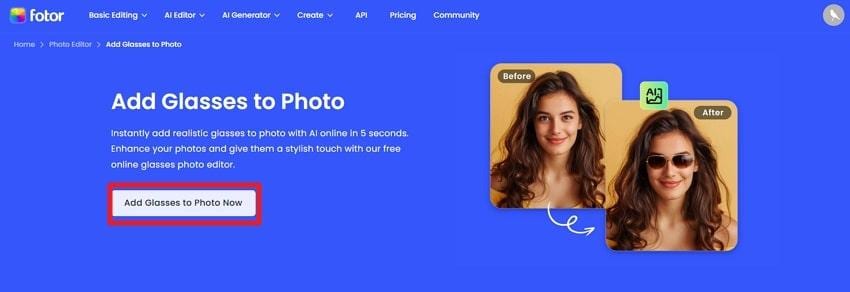
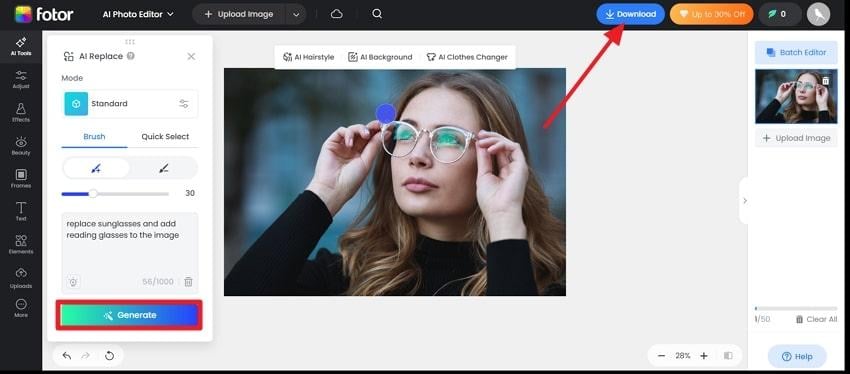
To add glasses to a photo online for free, you can opt for Fotor and utilize its one-click automated capability with no resizing required. This online platform enables one to add a detailed description of the element to be added or removed. It even offers 2 selection modes: Brush and Quick Select to incorporate or remove any particular type of glasses. All the edits can be saved directly on your device for later posting.
Tutorial to Apply Glasses to Images via Fotor
Step 1. Browse Fotor first, then press “Add Glasses to Photo Now” to access the tool's main workspace.
Step 2. Now, press the “Upload Image" button to add an image, then enter a prompt for adding the desired glasses.
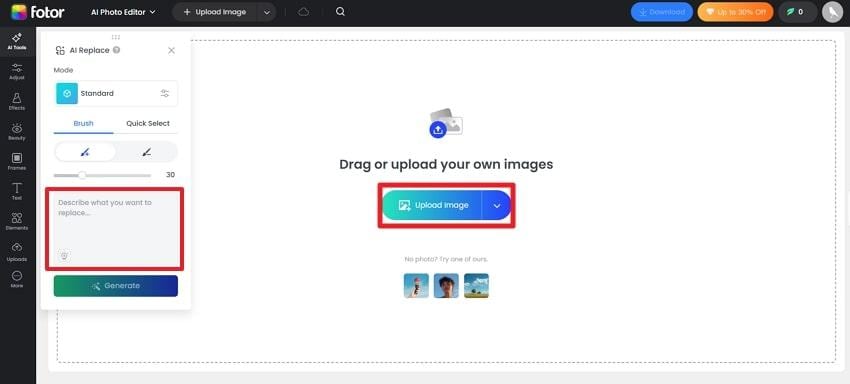
Step 3. Once added, click the “Generate” button for the results and press “Download” to save the edits made.
4. YouCam Makeup – Add Sunglasses to Photo with AI Stickers (Android/iOS)
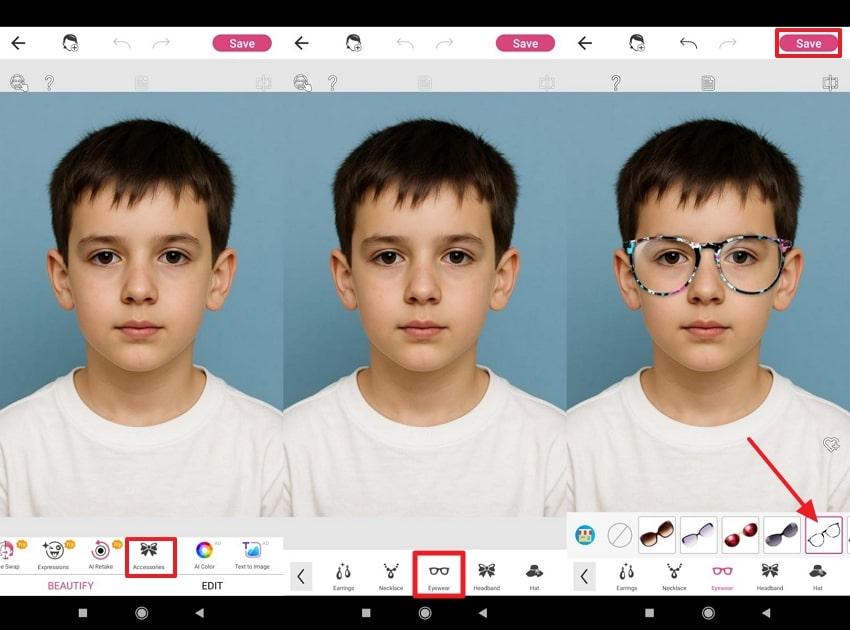
YouCam Makeup can effortlessly add glasses to a photo, enabling users to add virtual glasses and sunglasses to their faces. It offers an extensive collection of eyewear, including stylish, vintage, and modern styles, covering a broad spectrum of shapes. All the glasses and overlays are free to use for unlimited experimentation with new looks. Users can try multiple other accessories that include a headband, earrings, and a necklace.
Manual to Incorporate Glasses into Images with YouCam Makeup
- Download the app, access the “Photo Edit” option, and insert your image.
- Here, choose the “Accessories” tool, then select the “Eyewear" option from the options.
- Next, choose a specific eyewear and press the “Save” icon to download the glasses-applied picture.
5. Glasses Camera - Free App to Add Glasses and Sunglasses (Android)
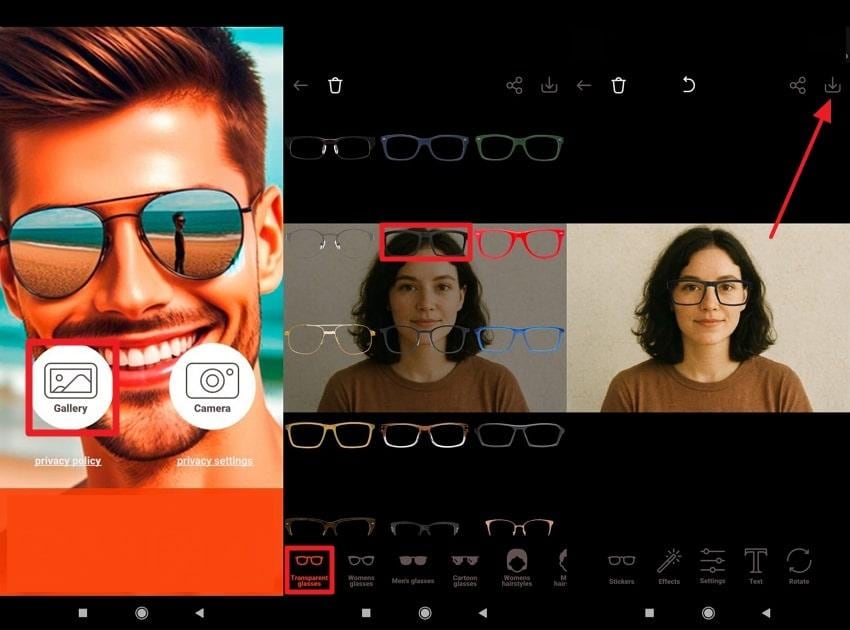
Glasses Camera offers an extensive gallery of stylish sunglasses and eyeglass stickers in classic, retro, and other styles. This app to add glasses to photos allows users to either capture a new photo or select one from their gallery. It includes all high-quality (HD) glasses stickers and frames that can be zoomed, rotated, and adjusted as per choice. More impressively, you’re facilitated with additional editing features such as brightness, contrast, and saturation.
Tutorial to Add Glasses to Pictures Using Glasses Camera
- Install the app, tap the “Gallery” option to import an image, and access the “Transparent Glasses” option.
- Next, select a style to apply, then navigate to “Download” to save the generated results.
If you’re still unsure about which app to consider and “add glasses to photo online”, review the provided tabular comparison:
| App or Tool | Glasses Placement | Face Detection or AI Fit | Customization Features |
| Repairit App | AI text prompt, automatic placement | Advanced AI facial analysis | Previews, effects, one-click edits |
| Snapchat | Real-time AR overlay, automatic | High accuracy with AR face tracking | Edit, combine filters, live video, export |
| Fotor | AI auto-fit, one-click placement | Smart AI auto-fit technology | Try-on preview, text prompts for personalized results |
| YouCam Makeup | AR glasses filter only | AR face detection for filters | Basic adjustments, apply AR filters, share |
| Glasses Camera | Stickers, frames, effects | Manual placement with zoom and rotation | Rotate, zoom, text, effects, image adjustments |
Among all, Repairit shines as the most reliable and professional solution due to its Text-to-Edit feature for glasses applications. Its immersive AI assistance doesn’t just add glasses; it improves the overall quality, maintaining the original integrity.
Part 4. Pro Tips to Make Glasses Look Natural When You Add Glasses to a Photo
Once you’re sorted with the tool and ready to add glasses to photo with AI, just read the tips provided below for a perfect blend:
- Match the Lighting and Shadows: Ensure the lighting on the glasses matches the overall lighting of your image, so AI can place glasses perfectly.
- Choose Frames That Suit Your Face Shape: When using AI platforms, experiment with different options to find the most flattering match for your features.
- Adjust Transparency for Realism: Reduce the opacity slightly in your edit, as this small adjustment adds a layer of authenticity that AI filters might not capture.
- Use Natural Colors and Finishes: Avoid overly bright or reflective glasses, stick to natural tones that complement your outfit and skin tone.
- Zoom In for Final Touch-Ups: Before saving, do a quick review to ensure there are no minor misplacements or color mismatches, resulting in flawless finishes.
Conclusion
In conclusion, the ability to add glasses to a photo with AI has transformed how we enhance and personalize images. Whether you're doing this for fashion, fun, or professional appeal, this digital tweak can completely redefine your look. When looking for a precise option, consider none other than the Repairit App and get AI-powered editing results in no time.
Frequently Asked Questions
-
Q1. Can I use the Repairit App to add reading glasses to my face photo?
The Repairit App allows you to easily add reading glasses to your face photo using its Text-to-Edit feature. It automatically detects your facial features and provides results after analyzing your command and image together. -
Q2. Do sunglasses filters work for group photos?
Most AI tools and filters, including Snapchat, are designed to add glasses to pictures and can recognize multiple faces. This means you can apply sunglasses or glasses to each person individually or to the group as a whole in real time. -
Q3. Does adding glasses affect image quality?
Not with apps like Repairit App, because it preserves your photo’s resolution and clarity even after adding glasses. The app maintains natural lighting and realistic reflections, guaranteeing the file image looks professional without loss in quality.






