
 TL;DR:
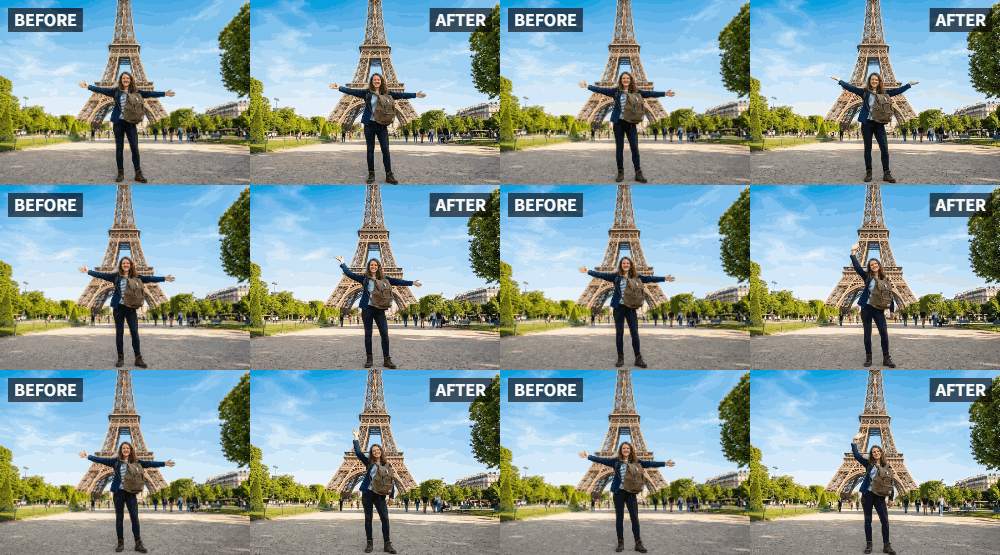
Relumi's Wave preset uses AI to transform static nature and travel photos into looping videos by adding gentle swaying motion to elements like water, foliage, and clouds.
● The animation generates in under a minute and primarily targets natural backgrounds, applying only a minimal, subtle movement to any people present in the image.
● The exported clip does not include native audio, requiring users to overlay environmental sounds using a separate video editor to complete the sensory effect.
● The feature requires no manual editing, works on old, faded, and black-and-white photos, and is available to test using the app's free tier with monthly credits.
Ask AI for a summary
 ChatGPT
 Perplexity
 Gemini
 Claude
 Grok
Grok
You're back from the most amazing beach vacation. The water was crystal clear, the palm trees were swaying, and you have the perfect photo to prove it. But when you look at it on your phone, it feels... still. The ocean is frozen, the palm fronds are static, and the magic of that moment—the gentle breeze, the sound of the waves—is completely missing. You want to share the feeling of being there, not just the sight.
This is exactly what Relumi's "Wave" preset was built for. It's designed to add a gentle, natural swaying motion to outdoor, nature, and travel photos. It makes the water shimmer, the trees breathe, and the whole scene feel alive, transforming a static snapshot into an immersive memory.
In this article
Part 1: The Static Vacation Photo Problem
On travel forums and subreddits like r/travel, users share their most stunning photos daily. But a common lament is that photos never quite capture the full sensory experience of a place. You can see the beauty, but you can't feel the breeze or hear the waves .
Video is the obvious answer, but not everyone films everything. Most travelers rely on photos. Relumi's Wave preset bridges this gap. It takes the photos you already have and injects them with the one element they're missing: the gentle, living movement of nature. A static beach scene becomes a looping video where the ocean laps and the palms sway, bringing viewers right back to the shore.
Part 2: How to Create a Living Beach Memory with Relumi


Relumi AI Photo Animation
Bring old photos to life with AI-powered animation.

 Preset motion styles — Wave, Dance, Clap, Cheers & more
-
Works on old, faded, and black-and-white photos
-
No editing skills required — generate in seconds
-
One tap turns any still image into a moving memory.
Bringing your vacation photos to life is incredibly simple.
Step 1: Pick Your Best Beach or Nature Shot
Choose a clear, well-lit photo from your trip. A landscape shot of the ocean, a photo of palm trees against the sky, or even a portrait of you on the beach with the scenery behind you all work beautifully. The more natural elements in the photo, the better.

Step 2: Upload to Relumi and Select the "Wave" Preset
Open the Relumi app, navigate to Photo Animation, and select the "Wave" preset. This motion style is specifically tuned for gentle, natural movement. The AI will analyze your photo and add a subtle, realistic sway to elements like water, foliage, and clouds.

Step 3: Share Your Immersive Memory
Export the animated clip. Now, you have a living memory to share.
- Instagram Reel: Post it as a Reel with a trending audio track or the sound of ocean waves. It will stop the scroll instantly .
- Travel Blog: If you have a travel blog, these animated clips are a fantastic way to add atmosphere to your posts.
- Digital Photo Frame: Load the clip onto a digital photo frame in your home, and let the vacation vibes flow all year round.

Part 3: Creative Travel Uses for the Wave Feature
The "Wave" preset isn't just for beaches. Use it for all kinds of travel memories.
- Mountain and Forest Hikes: Animate a photo of a forest with leaves gently rustling, or a mountain vista with clouds slowly drifting. It captures the peace of the hike .
- Cityscape Sunsets: Animate a photo of a city skyline at sunset, with clouds moving and perhaps a flag waving in the breeze.
- Desert Landscapes: Bring the subtle movement of sand dunes to life.
- Waterfalls and Rivers: Make a photo of a waterfall shimmer and flow, adding a sense of power and tranquility.
Conclusion
Your travel memories deserve to feel as alive as the moments they capture. With Relumi's "Wave" feature, you can transform your static vacation photos into immersive, living scenes that transport you and your viewers right back to the beach, the forest, or the mountain trail. Stop just showing where you went; start showing how it felt.
Frequently Asked Questions
-
Will the Wave animation work on a photo with people in it?
Yes, but the primary effect is on the natural background elements. The people in the photo will receive a very subtle, gentle movement that blends with the scene, keeping the focus on the overall atmosphere. -
How long does the animation take?
Just a few seconds. You can create an immersive, atmospheric video in under a minute. -
Can I add sound to the video, like ocean waves?
Absolutely! This is highly recommended. After exporting, use a simple video editor to overlay the sound of waves, wind, or birdsong to complete the sensory experience. -
Is the Wave preset free to use?
Relumi offers a free tier with monthly credits, perfect for experimenting with your travel photos.



