
 TL;DR:
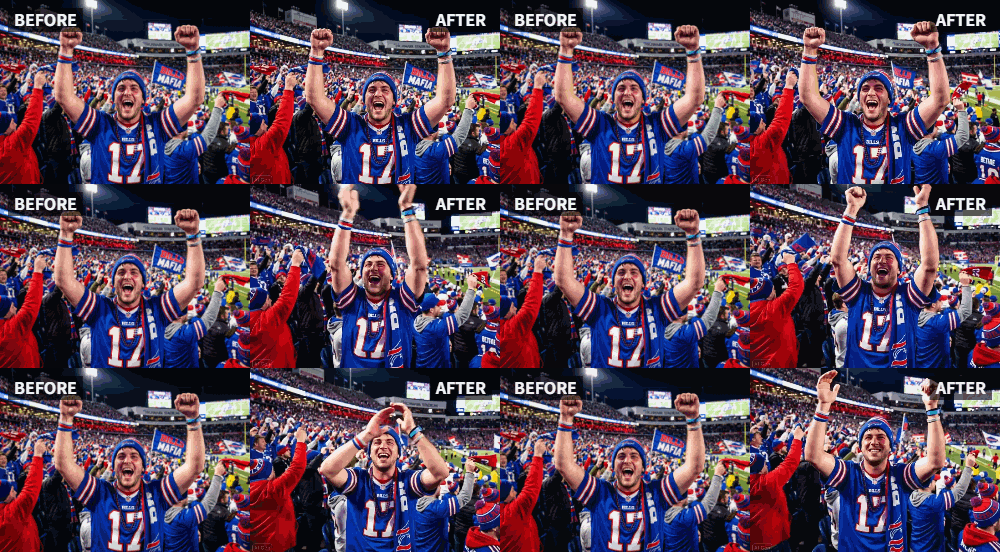
You can transform static team victory photos into moving videos where every player applauds by using the "Clap" preset motion style in Relumi's AI Photo Animation tool.
● For optimal AI face detection and synchronization across multiple subjects, the source image must be clear and high-resolution with visible faces and upper bodies.
● The processing takes only a few seconds but applies the motion to the entire scene simultaneously, meaning a separate solo portrait is required if you want to animate only a single player.
● The tool works on old, faded, or black-and-white images without requiring editing skills, though users will need a separate video editor to add crowd noise or music to the final output.
Ask AI for a summary
 ChatGPT
 Perplexity
 Gemini
 Claude
 Grok
Grok
The season is over. The championship is won. You have the team photo—everyone in their uniforms, smiling, holding the trophy. It's a perfect memory. But when you post it, it just sits there. You want to share the feeling of that victory, the roar of the crowd, the energy of the moment. A static photo can't do that.
Relumi's "Clap" feature can change that. By animating the team photo, you can make every player in the picture seem like they're applauding their own victory, bringing the energy of the championship celebration directly to your social media feed .
In this article
Part 1: The Limits of the Victory Photo
In sports forums and team parent groups, the struggle is real. After a big win, everyone wants to post the team photo. But the feedback is often lukewarm compared to the actual excitement of the game. The photo is a record of the win, but it doesn't convey the victory itself.
People crave a way to relive the energy. While video of the final buzzer is great, the posed team photo afterward is often static and anticlimactic . The desire is to inject some of that post-game celebration into the photo itself. This is where AI animation comes in, bridging the gap between a still memory and a living moment.
Part 2: How to Animate Your Team's Championship Photo


Relumi AI Photo Animation
Bring old photos to life with AI-powered animation.

 Preset motion styles — Wave, Dance, Clap, Cheers & more
-
Works on old, faded, and black-and-white photos
-
No editing skills required — generate in seconds
-
One tap turns any still image into a moving memory.
Bringing your team's victory photo to life is a straightforward process that yields high-impact results.
Step 1: Choose the Best Team Photo
Select a clear, well-lit team photo where the players' faces and upper bodies are visible. A photo where the team is gathered together, perhaps holding a trophy or banner, is ideal. The more clearly the individuals can be seen, the better the animation.

Step 2: Upload to Relumi and Select the "Clap" Preset
Open the Relumi app and navigate to the Photo Animation feature. Select the "Clap" motion style. The AI will work its magic, detecting the individuals in the photo and animating them with a synchronized clapping motion, as if they are all applauding their own hard-earned victory.

Step 3: Share the Living Victory Moment
Once generated, this animated clip is ready to dominate social media. Post it as a Reel on Instagram, a video on TikTok, or share it in team group chats. The motion will stop the scroll and make viewers feel the team's energy. For maximum impact:
- Add Crowd Noise: Use a simple video editor to overlay the sound of a cheering crowd.
- Add Pump-Up Music: Pair the animated clapping with a victory anthem or hype song.

Part 3: Creative Uses for Animated Team Photos Beyond the Win
This feature isn't just for the end-of-season victory photo. It can be used throughout the year to build team spirit.
- Pre-Game Hype Videos: Animate a team photo from a previous big win and use it as the climax of a pre-game hype video to get players motivated.
- End-of-Season Banquet Slideshows: Instead of just displaying a static team photo, have it come to life with clapping as you announce the team's accomplishments for the year. It adds a touch of magic to the ceremony.
- Fundraising and Recruitment Materials: An animated team photo on a fundraising page or recruitment brochure instantly conveys a sense of camaraderie, success, and positive energy, making your team more appealing to potential sponsors and new players.
Conclusion
A championship is about energy, emotion, and shared joy. Your team photo should reflect that. With Relumi's "Clap" feature, you can transform a static group shot into a living, breathing celebration, ensuring that the feeling of victory resonates every time the photo is seen.
Frequently Asked Questions
-
Will the clapping animation work on a large team photo with many small faces?
Yes, Relumi's AI is capable of detecting and animating multiple faces in a single image. For the best results, ensure the photo is high-resolution so the faces are as clear as possible. -
Can I animate just one player in the team photo?
The "Clap" feature is designed to animate the entire scene. If you want a single-player animation, it's best to use a solo portrait of that player. -
How long does it take to animate a team photo?
The processing time is very fast, usually just a few seconds, similar to animating a single-person photo. The AI is efficient at handling multiple subjects. -
Can I use this for other sports celebrations, like a personal best or a senior night?
Absolutely! Any moment worth celebrating is a perfect candidate. Animate a photo of an individual athlete achieving a personal best, or a senior player on their special night, to give the moment the energy it deserves.



