
 TL;DR:
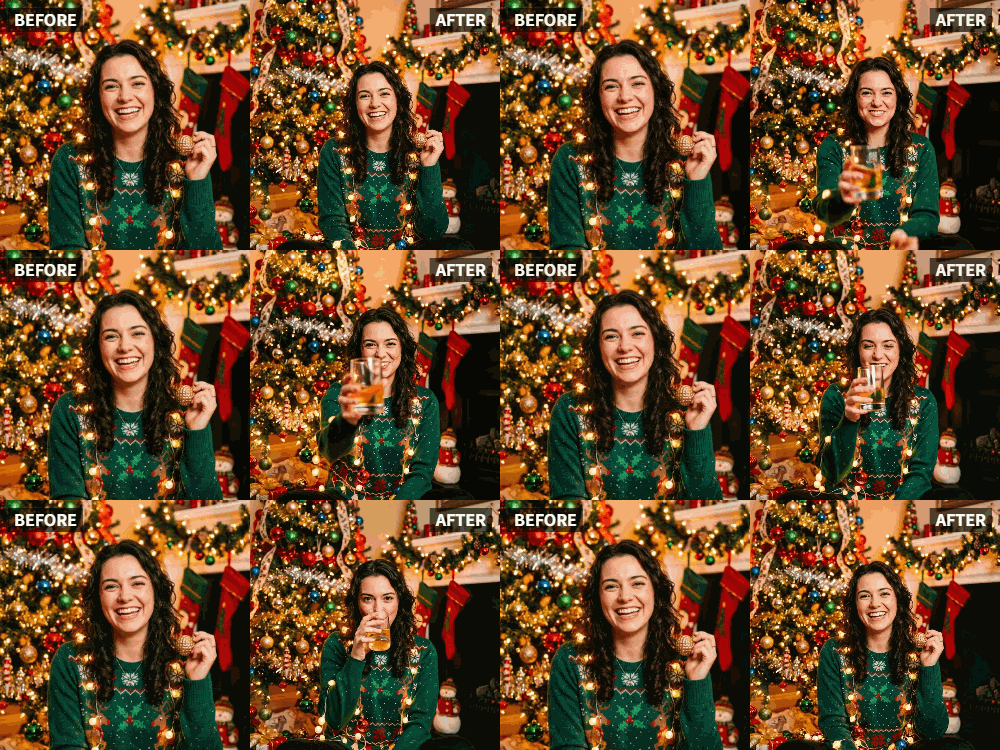
Transform static New Year's Eve party photos into synchronized toasting videos using the Cheers preset in the Relumi app.
● The AI requires a clear, well-lit photo where subjects and their glasses are clearly visible to accurately detect and animate faces and hands.
● The feature processes both solo portraits and large group shots in seconds, naturally recognizing various drinking vessels like champagne flutes, beer bottles, wine glasses, and cups.
● Relumi exports the animation as a silent video clip, requiring users to add text, music, or countdown sound effects natively within platforms like Instagram or TikTok.
Ask AI for a summary
 ChatGPT
 Perplexity
 Gemini
 Claude
 Grok
Grok
New Year's Eve is the ultimate celebration. You have the photos—friends holding champagne flutes, smiles all around, the countdown about to begin. But when you post them on Instagram or TikTok the next day, they feel flat. They capture the moment, but not the energy of midnight. The cheering, the clinking, the joy—it's all missing.
This is where Relumi's "Cheers" feature comes in. It's specifically designed for party photos and celebration moments. By animating a photo to the "Cheers" preset, you make everyone in the picture raise their glasses in a synchronized toast, bringing the exact feeling of a midnight celebration to your social media feed.
In this article
Part 1: The Post-Party Post Problem
On New Year's Day, social media is flooded with the same thing: static photos from the night before. People hold up their glasses, smile for the camera, and... that's it. The photo is a record, but it doesn't make viewers feel anything.
On Reddit's r/socialmedia, users often discuss how to make holiday content stand out. The consensus is that static images underperform video, but not everyone has video from the party . Relumi's Cheers feature fills this gap perfectly. It takes the photos you already have and injects them with the exact energy of the moment—the toast, the cheer, the celebration. It turns a "photo of a party" into a "party video" in seconds.
Part 2: How to Create a New Year's Cheers Video with Relumi


Relumi AI Photo Animation
Bring old photos to life with AI-powered animation.

 Preset motion styles — Wave, Dance, Clap, Cheers & more
-
Works on old, faded, and black-and-white photos
-
No editing skills required — generate in seconds
-
One tap turns any still image into a moving memory.
Creating your own viral-worthy New Year's video is incredibly simple.
Step 1: Pick Your Best Party Photo
Choose a clear, well-lit photo from your New Year's Eve celebration. A group shot of friends holding glasses is ideal, but even a solo portrait with a champagne flute works beautifully. The key is to have the subjects and their glasses clearly visible.

Step 2: Upload to Relumi and Select the "Cheers" Preset
Open the Relumi app, navigate to Photo Animation, and select the "Cheers" preset. This motion style is purpose-built for this exact moment. The AI will detect the people in the photo and generate a smooth, synchronized raising of glasses, as if everyone is toasting at midnight.

Step 3: Add Music and Share
Export the animated clip. Now, open Instagram or TikTok. Create a new Reel, upload your cheering video, and add a trending audio track—or better yet, a clip of "Auld Lang Syne" or a countdown sound effect. The combination of the animated toast and the music will transport viewers right back to midnight.

Part 3: Creative New Year's Uses for the Cheers Feature
The "Cheers" feature isn't just for the main event. Use it in these creative ways:
- Countdown Teaser Posts: In the days leading up to New Year's, post animated "cheers" videos from previous years with captions like "Getting ready to do it all over again! #NYE"
- New Year's Day Recap Reels: Compile your best animated cheering clips from the night into a single highlight reel set to celebratory music.
- Animated New Year's Cards: Instead of a static family photo for your digital New Year's card, send an animated version where everyone raises their glass to greet the new year .
- "Midnight in Different Time Zones" Content: If you have friends in different time zones who celebrated earlier, animate their photos cheering and post them as the clock strikes midnight in your zone.
Conclusion
New Year's Eve is about energy, celebration, and new beginnings. Don't let your memories be static. With Relumi's "Cheers" feature, you can transform your party photos into living, breathing celebrations that capture the true spirit of the moment and make your social media feed the one everyone stops to watch.
Frequently Asked Questions
-
Will the cheers animation work if people are holding different things, like beer bottles or cups?
Yes! The AI is trained on a wide variety of drinking vessels. It will generate a natural "raising" motion whether they're holding champagne flutes, beer bottles, wine glasses, or even just cups. -
Can I animate a group photo with many people?
Absolutely. The "Cheers" preset is perfect for group shots. The AI will detect all the faces and hands and generate a synchronized toast among the whole group. -
How long does the animation take?
Just a few seconds. You can create a shareable, engaging video in under a minute. -
Can I add text to the video, like "Happy New Year!"?
Yes. After exporting the clip from Relumi, use Instagram's built-in text tool or any simple video editor to add your message.



