
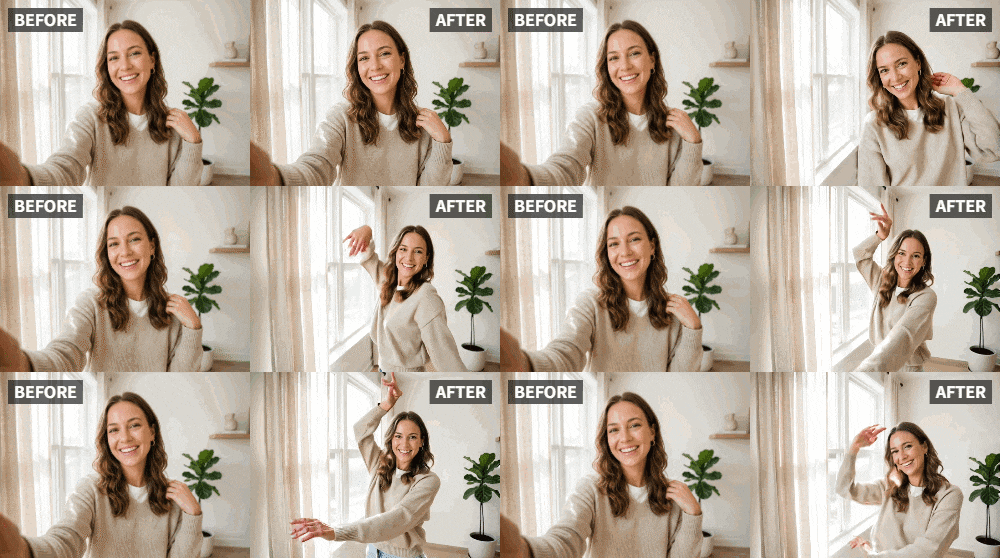
 TL;DR:
Relumi's Dance preset transforms a static, front-facing selfie into a 3-5 second loopable dancing video for platforms like Instagram Reels.
● Requires a clear portrait of a single subject with a neutral or slight smile, as heavily filtered or blurry images reduce output quality.
● Group photos produce unpredictable dance animations, making the Wave or Clap presets a better choice for images with multiple people.
● The app generates a silent visual animation, requiring you to add your chosen music track natively within Instagram or TikTok after exporting the file.
Ask AI for a summary
 ChatGPT
 Perplexity
 Gemini
 Claude
 Grok
Grok
You've seen them on your Instagram Explore page—a static photo of a person suddenly bursts into a rhythmic dance, looping perfectly to a trending audio clip. It's eye-catching, fun, and you think, "How did they do that?" You've tried a few apps, but the results were glitchy, the faces distorted, or the video was locked behind a paywall before you could save it. You just want your own photo to move naturally.
This is the exact problem Relumi's "Dance" feature was built to solve. It's the most popular preset for a reason. It takes any still portrait and, with one tap, generates a short, smooth video of the subject moving to a natural, rhythmic dance. It's the secret weapon for content creators, influencers, and anyone who wants their Instagram feed to stop the scroll.
In this article
Part 1: Why "Dancing Photos" Are the Secret to Social Media Engagement
The Instagram algorithm favors video content, especially Reels. But not everyone has the time, skills, or confidence to film and edit complex dance videos. This is where AI photo animation bridges the gap. A static photo, even a great one, competes with thousands of others. An animated photo that dances? It's an instant standout.
On Reddit's r/InstagramMarketing, users constantly ask for ways to increase engagement without constantly being on camera. The desire for "scroll-stopping" content is universal . Relumi's Dance feature delivers exactly that. It turns a simple selfie into a dynamic video clip that's perfectly formatted for a Reel. You get the visual interest of video with the simplicity of a photo. Users who post animated selfies report more saves, more shares, and a flood of DMs asking "what app is that?" .
Part 2: How to Turn Your Selfie into a Dancing Video with Relumi


Relumi AI Photo Animation
Bring old photos to life with AI-powered animation.

 Preset motion styles — Wave, Dance, Clap, Cheers & more
-
Works on old, faded, and black-and-white photos
-
No editing skills required — generate in seconds
-
One tap turns any still image into a moving memory.
Creating your own viral-ready dancing selfie is incredibly simple and takes less than a minute.
Step 1: Pick Your Best Selfie
Choose a clear, well-lit selfie where you are the main subject. A front-facing portrait works best. Photos where you have a neutral or slightly smiling expression give the AI a great canvas to work with. Avoid heavily filtered or extremely blurry images for the cleanest result.

Step 2: Upload to Relumi and Select the "Dance" Preset
Open the Relumi app and navigate to the Photo Animation feature. From the list of motion styles, select "Dance." This preset is purpose-built for generating smooth, rhythmic, full-body movement that looks natural and engaging, not like a glitch or a random shake.

Step 3: Generate, Save, and Post to Instagram
Tap generate. Within seconds, you'll see a preview of your selfie, now dancing. If you love it, tap save. The clip is exported as a standard video file to your camera roll. Now, open Instagram, create a new Reel, select your dancing video, and add a trending audio track. The app will automatically loop it to the beat, creating a seamless, engaging post. You can also post it as a Story or a standard video.

Part 3: Creative Ways to Use Dancing Selfies Beyond the Basic Reel
The "Dance" feature is versatile and can be used for much more than just a simple social media post.
- Reacting to Music: Find a new song you love. Animate a selfie with the Dance preset, then post it as a Reel with that song. It looks like you're grooving to the track, creating a fun, personal music reaction video without having to film yourself dancing .
- Celebrating Good News: Got a promotion, finished a big project, or just having a great day? Animate a selfie dancing and share it with a caption like "Me celebrating finally finishing that report!" It's a fun, lighthearted way to share your joy.
- Creating a Signature Intro/Outro for Your Content: If you're a content creator, use a dancing selfie as a recurring intro or outro for your longer videos. It becomes a recognizable part of your brand—a fun, dynamic signature that viewers will come to expect.
- Birthday and Celebration Posts: Instead of a static "It's my birthday!" photo, post a dancing selfie. It captures the energy of a celebration far better than a still image ever could.
Conclusion
You don't need to be a dancer or a video editor to create engaging, scroll-stopping content for Instagram. With Relumi's "Dance" feature, a single tap transforms your static selfies into dynamic, rhythmic videos that are ready to post. It's the easiest way to bring your photos to life and make your social media feed move to the beat.
Frequently Asked Questions
-
Will the dance animation look natural on a photo where I'm just standing still?
Yes! That's exactly what it's designed for. The AI is trained to generate natural, rhythmic movement from a static pose. It will look like you've started dancing, not like the photo is glitching. -
Can I make a group photo dance?
The Dance preset works best on a single main subject. For a group, the results can be less predictable, but it's fun to experiment. For guaranteed great results with groups, you might try the "Wave" or "Clap" presets. -
How long is the dancing video clip?
Relumi generates a short, loopable clip, typically 3-5 seconds long. This is the perfect length for a seamless loop on Instagram Reels or TikTok. -
Do I need to add music in Relumi?
No. Relumi focuses on visual animation. You add the music later when you post the video to Instagram, TikTok, or another platform. This gives you the flexibility to choose any trending audio.



