
 TL;DR:
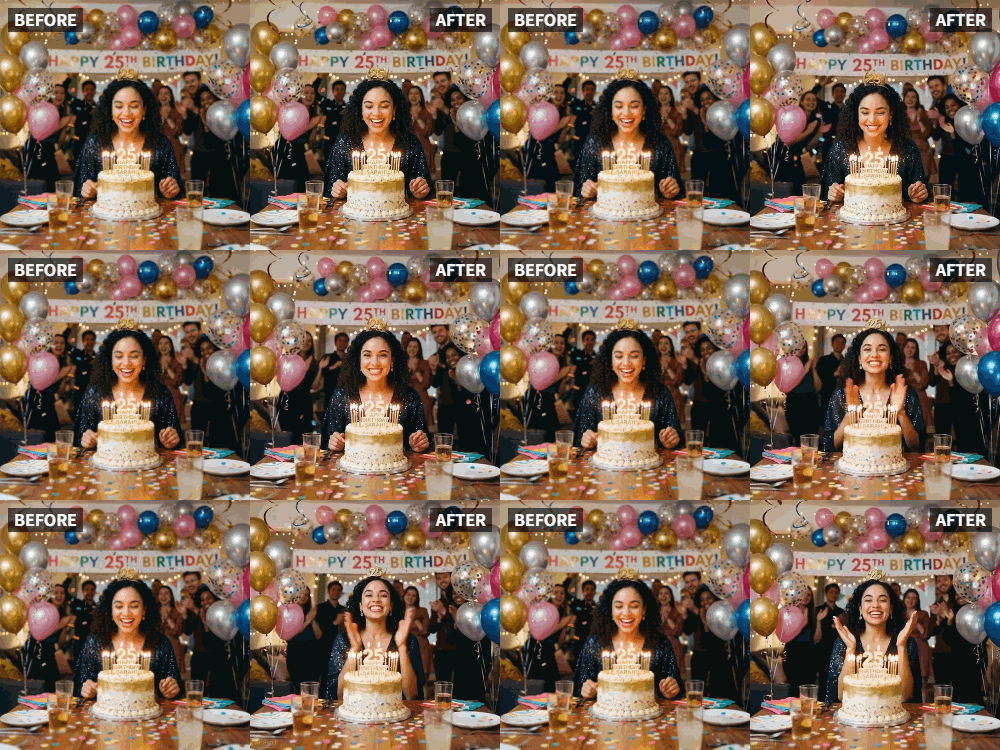
Relumi AI's "Clap" preset animates a static photo into a realistic clapping motion, offering a direct alternative to complex After Effects keyframing for adding dynamic subject reactions to tribute videos.
● The AI generates a 3 to 5-second loopable video clip that automatically adapts the applauding movement to the anatomical posture of the subject, whether they are sitting or standing.
● Optimal results require a clear, front-facing image of a single person with a smiling or neutral expression, as the preset is not currently optimized for group photos.
● The exported clip requires no advanced editing skills and can be imported into any basic video editor to function as a picture-in-picture overlay, scene transition, or standalone animated greeting.
Ask AI for a summary
 ChatGPT
 Perplexity
 Gemini
 Claude
 Grok
Grok
You know the feeling. It's your best friend's 30th birthday, and you're putting together a group video from all their loved ones. Everyone sends in their clips: "Happy Birthday, Sarah!" They wave, they smile, they hold up signs. But something feels missing. There's no energy, no reaction. You wish you could show Sarah's face in the video reacting to all these wonderful messages.
This is the exact problem solved by Relumi's "Clap" animation feature. It lets you take a still photo of the guest of honor and make them look like they're applauding, celebrating, and loving every second of their own tribute video . It turns a standard birthday compilation into a dynamic, emotional experience where the birthday person seems to be right there, celebrating with everyone.
In this article
Part 1: The Missing Piece in Birthday Tributes
On subreddits like r/videography and r/VideoEditing, hobbyists and pros alike discuss the challenge of making tribute videos feel alive. A common thread is the "static hero shot"—a photo of the guest of honor that sits in the video, unmoving, while messages play over it. It works, but it doesn't celebrate.
Generic solutions involve complex keyframing in After Effects or trying to loop a separate video clip of someone clapping, which never quite matches the photo . What people really want is for that specific person—the one in the photo—to seem engaged. They want Sarah to look like she's applauding the messages being sent to her. Relumi's Clap feature makes this possible in seconds. It applies a realistic clapping motion to the person in the photo, making them an active participant in their own celebration .
Part 2: How to Create a Dynamic Birthday Surprise with Relumi
Creating a birthday video with a "reacting" guest of honor is simple and requires no advanced editing skills.


Relumi AI Photo Animation
Bring old photos to life with AI-powered animation.

 Preset motion styles — Wave, Dance, Clap, Cheers & more
-
Works on old, faded, and black-and-white photos
-
No editing skills required — generate in seconds
-
One tap turns any still image into a moving memory.
Step 1: Choose the Perfect Photo of the Birthday Person
Select a clear, front-facing photo of your friend or family member. A photo where they are smiling or have a neutral expression works best. The AI needs a clear view of the face and upper body to generate a natural clapping motion.

Step 2: Upload to Relumi and Select the "Clap" Preset
Open the Relumi app and navigate to the Photo Animation feature. From the list of motion styles, choose "Clap." This preset is specifically designed to generate a rhythmic, celebratory hand-clapping motion. The AI analyzes the person's pose and naturally animates their hands coming together in applause.

Step 3: Integrate the Animated Clip into Your Video Compilation
Export the animated clip of your friend clapping. Now, import it into your video editing software (even a simple, free one will do). Place this animated clip strategically. For example:
- At the very end of the video, after all the birthday messages have played, show your animated friend clapping in appreciation.
- As a transition between different sections of the video.
- Overlaid in a corner as a "reaction shot" throughout the video.

Part 3: Creative Ways to Use the Clap Feature for Birthdays
The "Clap" feature isn't just for the end of a video. Here are some other powerful ways to use it for birthday celebrations.
- Animated Birthday Cards: Create a digital birthday card where a photo of the birthday person is animated, clapping as the card is opened. You can add text like "Hip, Hip, Hooray!" and export it as a video file to send via WhatsApp or social media .
- Social Media Story Shout-Outs: Post a photo of the birthday person on your Instagram or Facebook story, but with a twist—it's animated and clapping. Add a "Happy Birthday!" sticker, and watch your story engagement soar as friends stop to see the moving image .
- Group Chat Reaction: Drop an animated clapping photo of the birthday person into your group chat when everyone is sending wishes. It's a fun, personalized reaction that beats any standard emoji or GIF .
Conclusion
A birthday is a celebration, and your tribute video should feel like one. By using Relumi's "Clap" feature, you transform the birthday person from a passive image into an active, joyful participant in their own surprise. It's a simple touch that adds a huge dose of heart, humor, and energy, making your video the one everyone remembers.
Frequently Asked Questions
-
Will the clapping animation look natural on someone who is sitting down?
Yes, Relumi's AI is trained to understand different poses. It will generate a clapping motion that is anatomically consistent with the person's posture, whether they are standing, sitting, or even leaning. -
Can I make a group photo clap?
The "Clap" feature is optimized for a single main subject. For group photos, you may get the best results by focusing on one person, or you can experiment to see how the AI handles multiple figures. -
How long does the animated clapping clip last?
Relumi generates a short, loopable video clip, typically 3-5 seconds long. This is the perfect length for a continuous, natural-looking applause loop in your video projects. -
Do I need a video editing degree to add this to a birthday video?
Absolutely not. Any basic video editing app on your phone or computer allows you to import video clips and arrange them. Adding this animated clip is as simple as dragging and dropping it into your timeline.



