
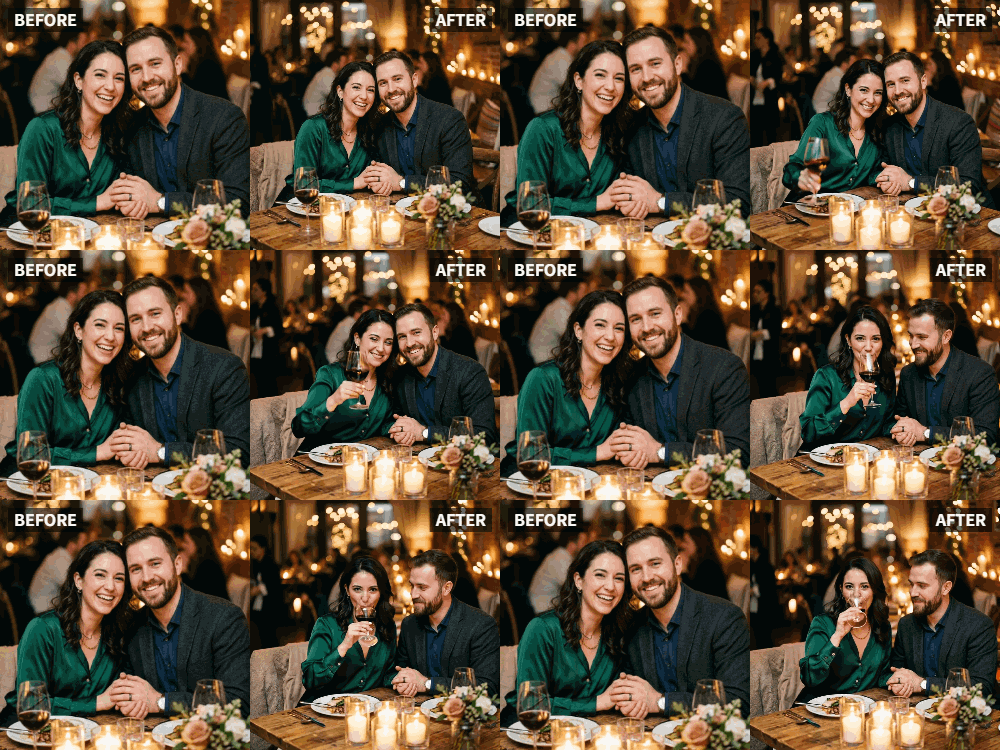
 TL;DR:
Use the Relumi app's "Cheers" preset to animate static photos of you and your partner raising glasses into a dynamic looping video for a romantic date night surprise.
● The "Cheers" preset specifically requires subjects to be holding glasses; for photos where you are just looking at each other without glasses, select the "Wave" or "Dance" presets instead.
● The AI tool functions across a range of lighting conditions, successfully animating dark, dimly lit, or candlelit dinner photos while maintaining the atmospheric result.
● To add background music or personalized text messages to the animated toast, you must export the clip from Relumi and apply those additions using a separate video editor.
Ask AI for a summary
 ChatGPT
 Perplexity
 Gemini
 Claude
 Grok
Grok
A romantic dinner, a bottle of wine, a toast to love. It's a classic date night moment, and you probably have a photo of it. But when you look at it later, it's just a picture. It doesn't capture the clink of the glasses, the look in each other's eyes, the feeling of being in that moment together.
Relumi's "Cheers" feature can bring that romantic memory back to life. Animate a photo from your favorite date night and watch as the two of you raise your glasses in a timeless toast to your love. It's the perfect surprise for a date night, anniversary, or Valentine's Day.
In this article
Part 1: Reliving the Romance, Not Just the Photo
On relationship forums, couples often share ideas for keeping the spark alive. Small, thoughtful gestures are frequently cited as the most meaningful. A surprise that brings back a cherished memory is a powerful way to say "I love you" .
An animated "cheers" video from a favorite date night does exactly that. It takes a static memory and makes it dynamic, bringing the emotion of that moment back into the present. It's a way of saying, "I remember this night, and I'd relive it with you all over again."
Part 2: How to Create an Animated Date Night Toast


Relumi AI Photo Animation
Bring old photos to life with AI-powered animation.

 Preset motion styles — Wave, Dance, Clap, Cheers & more
-
Works on old, faded, and black-and-white photos
-
No editing skills required — generate in seconds
-
One tap turns any still image into a moving memory.
Creating this romantic surprise is quick and easy.
Step 1: Choose Your Favorite Date Night Photo
Select a clear photo from a memorable date. A shot of the two of you at a restaurant, raising your glasses in a toast, is perfect. A photo from a picnic, a vacation dinner, or any special occasion works beautifully.

Step 2: Upload to Relumi and Apply the "Cheers" Preset
Open the Relumi app, go to Photo Animation, and select the "Cheers" preset. The AI will bring the photo to life, animating your toast in a smooth, romantic loop.

Step 3: Surprise Your Partner
Export the clip and choose your moment.
- Date Night Surprise: Right before your next date night, text them the video with a message like "Can't wait to toast with you tonight."
- Anniversary Gift: Include the animated video in a digital card or gift.
- Valentine's Day Post: Share it on social media with a heartfelt caption, tagging your love .
- Just Because: Send it on a random Tuesday just to make them smile.

Part 3: Creative Romantic Uses for the Cheers Feature
This idea can be used for many romantic milestones.
- Engagement Night Flashback: Animate a photo from the night you got engaged, toasting to your new future together.
- Honeymoon Memories: Animate a photo from your honeymoon where you're enjoying a romantic dinner.
- Long-Distance Love: If you're apart, send an animated "cheers" video from a favorite memory to feel connected across the miles.
- "Our Song" Video: Pair the animated toast with "your song" in a video editor for a complete, romantic mini-movie.
Conclusion
Romance is in the details, the small gestures that say "I remember, I cherish, I love you." By using Relumi's "Cheers" feature to animate a favorite date night photo, you create one of those gestures—a living memory of a toast to your love, brought back to life just to make them smile.
Frequently Asked Questions
-
What if our date night photo is dark or candlelit?
That's fine! Relumi's AI works with a range of lighting conditions. A romantic, dimly lit photo can produce an even more atmospheric result. -
Can I animate a photo where we're not holding glasses, but just looking at each other?
For that type of photo, the "Wave" or "Dance" presets might be more appropriate. "Cheers" is specifically for toasting. -
How can I make the video feel even more romantic?
Add a soft, romantic song in the background. Export the clip and use a simple video editor to overlay the audio. -
Can I add text like "To us" to the video?
Absolutely. After exporting, use a simple editor to add a personal message.



