
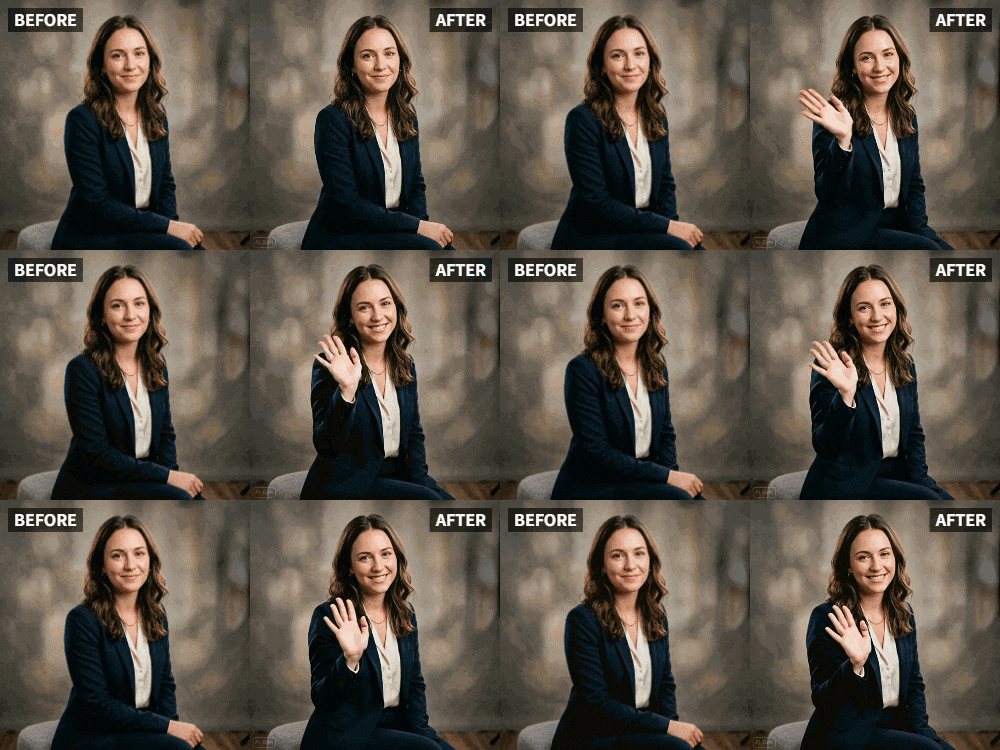
 TL;DR:
You can generate an animated farewell video for departing colleagues by applying Relumi's AI Wave animation to a standard team photo or individual selfies.
● For the most natural waving movement, ensure everyone's hands are relaxed, slightly raised, and not hidden or overlapping in the original image.
● The tool supports animating up to 10 to 15 faces in a single group photo, while larger teams must animate individual shots and compile them manually.
● The AI gesture tracking focuses primarily on hands, allowing it to successfully apply the wave animation even if subjects are wearing face masks.
Ask AI for a summary
 ChatGPT
 Perplexity
 Gemini
 Claude
 Grok
Grok
Saying goodbye to colleagues is hard. You want to leave a lasting impression. A static group photo is nice, but a dynamic one where everyone waves goodbye is unforgettable. On Reddit's r/careerguidance, users discuss creative farewell ideas: "I want to give my team something they'll remember." This article shows how Relumi's Wave animation can help you create a touching farewell video that captures the spirit of your team. We'll explore why farewells matter, the step-by-step creation process, and numerous ways to use waving animations for departures, retirements, and transitions.
In this article
Part 1: The Challenge of Making Farewells Memorable
When someone leaves, we often take a group photo and maybe write a card. But these mementos are quickly forgotten. Animated content, however, stays in memory. On Quora, people ask how to make farewells more personal. A waving goodbye video captures the emotion of the moment. It's a keepsake that colleagues will watch again and again. According to HR professionals, personalized farewells improve team morale and show appreciation. In fact, a study by OfficeVibe found that employees who feel appreciated are 67% more engaged. A waving farewell video is a modern, creative way to express that appreciation. It also serves as a digital memento that the departing person can keep forever.
Part 2: Step-by-Step Farewell Video Creation


Relumi AI Photo Animation
Bring old photos to life with AI-powered animation.

 Preset motion styles — Wave, Dance, Clap, Cheers & more
-
Works on old, faded, and black-and-white photos
-
No editing skills required — generate in seconds
-
One tap turns any still image into a moving memory.
1. Take a Group Photo: Gather the team for a photo where everyone is smiling and visible. Ensure hands are not hidden behind others. If possible, have everyone raise a hand slightly to make the wave more natural. Choose a location with good lighting—natural light works best.

2. Animate Each Person Waving: You can animate individual photos and combine them, or use a group photo—the AI can handle multiple faces. If using individual shots, have each person take a waving selfie against a plain background. This allows for more control over the wave. If using a group photo, ensure faces are clear and not overlapping.

3. Compile into a Video: Use a simple editor to add background music and text like "We'll miss you!" You can also include voice messages from team members. Arrange the clips in a logical order—perhaps alphabetical or by team role. Add transitions between clips for a professional look. Export in high resolution for sharing.

Part 3: Creative Farewell Ideas
- Individual Goodbyes: Animate each team member waving and saying "Good luck!" in a video montage. This personal touch means a lot. You can even have each person hold a sign with a message (e.g., "You're awesome!").
- Remote Team Farewell: For remote teams, have everyone send a waving selfie, then combine. It bridges the distance. Add a map graphic showing where each person is located.
- Farewell Party Invitation: Use a waving photo as a video invitation to the farewell party. It sets a fun tone and builds excitement.
- Digital Scrapbook: Create a digital scrapbook with waving photos and messages. Share via a link using services like Google Drive or Dropbox.
- Retirement Tribute: For retirees, compile waving photos from current and former colleagues. Include photos from their early career to now, all waving.
- Thank You Video: After the farewell, send a waving thank-you video to express gratitude for the years together.
- LinkedIn Post: Post the waving video on LinkedIn, tagging the departing colleague and celebrating their contributions. It's a public tribute that they'll appreciate.
Conclusion
Make your farewell unforgettable. With Relumi's Wave animation, you can create a goodbye that truly waves from the heart. Your colleagues will appreciate the effort, and the memory will last. In a world where job changes are common, a heartfelt farewell video stands out as a genuine gesture of appreciation.
Frequently Asked Questions
-
Can I animate a photo where people are wearing masks?
Yes, but results may vary. The AI focuses on hand gestures, so masks won't prevent the wave animation. -
How do I ensure everyone's wave looks natural?
Relumi's AI is trained on natural movements. For best results, use photos where people's hands are relaxed. -
Can I add subtitles or names?
Yes, any video editor allows text overlays. You can label each person as they wave. -
Is it appropriate for formal farewells?
Absolutely. A subtle wave is professional and warm. You can keep the animation gentle. -
What if the departing colleague is remote and can't be in the group photo?
You can still create a video of the team waving and send it to them. They'll appreciate the gesture. -
How many people can the AI handle in one photo?
The AI can handle up to 10-15 faces in a single photo, but for larger groups, consider animating individuals and combining later.



