
 TL;DR:
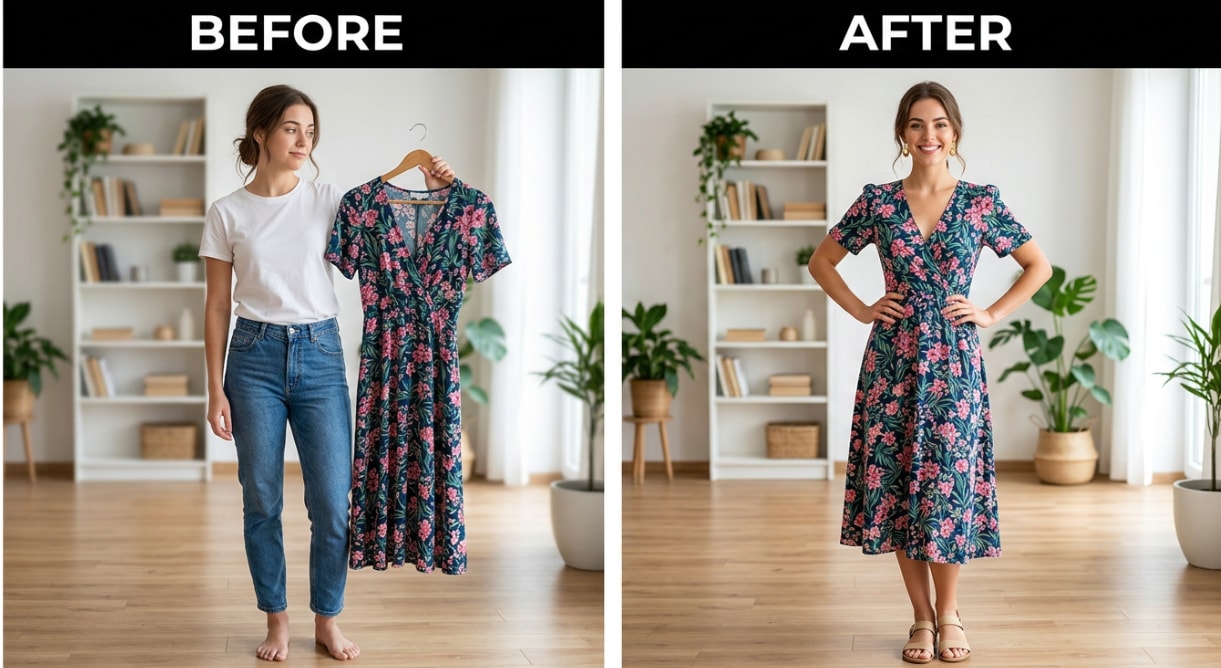
Relumi’s Combine Photo — Virtual Fashion Try-On for iOS and Android generates realistic images of any garment from any source on your exact body shape in under 30 seconds without defaulting to an idealized model template.
● The tool requires a clear, well-lit full-body or three-quarter-body portrait with a simple background and no physical obstructions to accurately render the clothing drape against your actual height and frame.
● You can upload clothing screenshots, thrift store photos, or flat-lays from any platform, optionally apply scene descriptions, and rapidly test multiple outfits on the same anchored portrait without re-uploading.
● The core try-on functionality and standard resolution saves are available for free, while higher export resolutions and advanced generation options require a paid subscription.
Ask AI for a summary
 ChatGPT
 Perplexity
 Gemini
 Claude
 Grok
Grok
You’ve been there: you find a great outfit online, it looks amazing on the model, you order it — and when it arrives, it’s completely wrong on your body. The color is off, the proportions don’t work, or the style just doesn’t suit you. The model is 5’11” and you’re not. You return it and start over.
Relumi’s Combine Photo — Virtual Fashion Try-On lets you upload your own photo and a photo of any outfit, then generates a realistic image of you wearing that outfit — before you buy, before you try it on, and before you waste the shipping. Here’s exactly how it works and what you can do with it.
In this article
Part 1: Why Online Clothes Shopping Is Still Such a Gamble
Online shopping has been around for decades, but the core problem hasn’t been solved: you can’t see how a piece of clothing actually looks on your body until it arrives. Here are the four reasons that keep tripping people up.
1. The model in the product photo looks nothing like you
Brand product photos are shot on tall, slim models under perfect studio lighting. The same dress on a different body type, different height, or different skin tone can look completely different. Size charts help you pick the right number, but they don’t tell you whether the proportions will work on your actual frame.
2. Most AI try-on tools alter your body shape
Most AI virtual try-on tools are trained on fashion model datasets, so they tend to subtly — or not so subtly — reshape your body toward an idealized figure. The result is a photo that doesn’t show how the outfit will actually look on you; it shows how it might look on an AI-adjusted version of you. That’s not useful feedback for a purchase decision.
3. Try-on apps are limited to their own catalog
Retail virtual try-on features — the kind built into individual brand websites — only work within that brand’s catalog. You can’t use them to preview an item from a different store, a thrift find, or something you saw a friend wearing. If you want to try on clothes from any source, you need a tool that works with any photo.
4. Planning multiple outfits takes way too long
Even people who aren’t buying anything new sometimes just want to plan. Which top goes with which pants? How does this blazer look with those shoes? Laying clothes flat next to each other or stacking photos in Notes doesn’t show you what the outfit looks like as a complete look on a body. You have to physically try things on to find out — until now.
Relumi’s Virtual Fashion Try-On solves all four problems. Any outfit from any source, on your actual body proportions, in under 30 seconds, free on iOS and Android.
Part 2: How Relumi Virtual Fashion Try-On Works


Relumi AI Photo Enhancer
Combine Photo — Virtual Fashion Try-On: See Any Outfit on Your Actual Body Before You Buy It — Free on iOS & Android

 Works with any outfit from any source: Screenshot a product from any online store, photograph something in your own wardrobe, or grab an image from a social post — Relumi accepts any garment photo. You’re not limited to a single brand’s catalog or a built-in clothing library.
-
Your body proportions stay yours: The AI drapes the garment over your actual photo without reshaping your silhouette, slimming your waist, or adjusting your height. What you see is what the outfit would realistically look like on your actual frame — not an idealized version of you.
-
Realistic fabric and fit rendering: The output accounts for how fabric drapes, folds, and fits based on the garment type. A flowy maxi dress behaves differently from a structured blazer. The try-on result reflects that difference rather than just pasting the clothing image onto your photo.
The fundamental difference between Relumi and a standard virtual try-on tool is that Relumi uses your actual portrait as the anchor. It doesn’t place the outfit on a generic body template — it places it on you. The AI reads your body proportions, posture, and skin tone from your uploaded photo, then generates a realistic output showing exactly that person wearing exactly that garment.
How to Use Relumi Combine Photo — Virtual Fashion Try-On on iPhone
Step 1. Open Combine Photo & Upload Your Portrait
Open Relumi, tap Combine Photo from the home screen, then select Virtual Fashion Try-On. Tap the first photo slot and select a clear photo of yourself from your camera roll. A full-body or three-quarter-body shot works best — the AI needs to see your torso and lower body to generate an accurate garment fit. Good lighting and a simple background give the cleanest results.

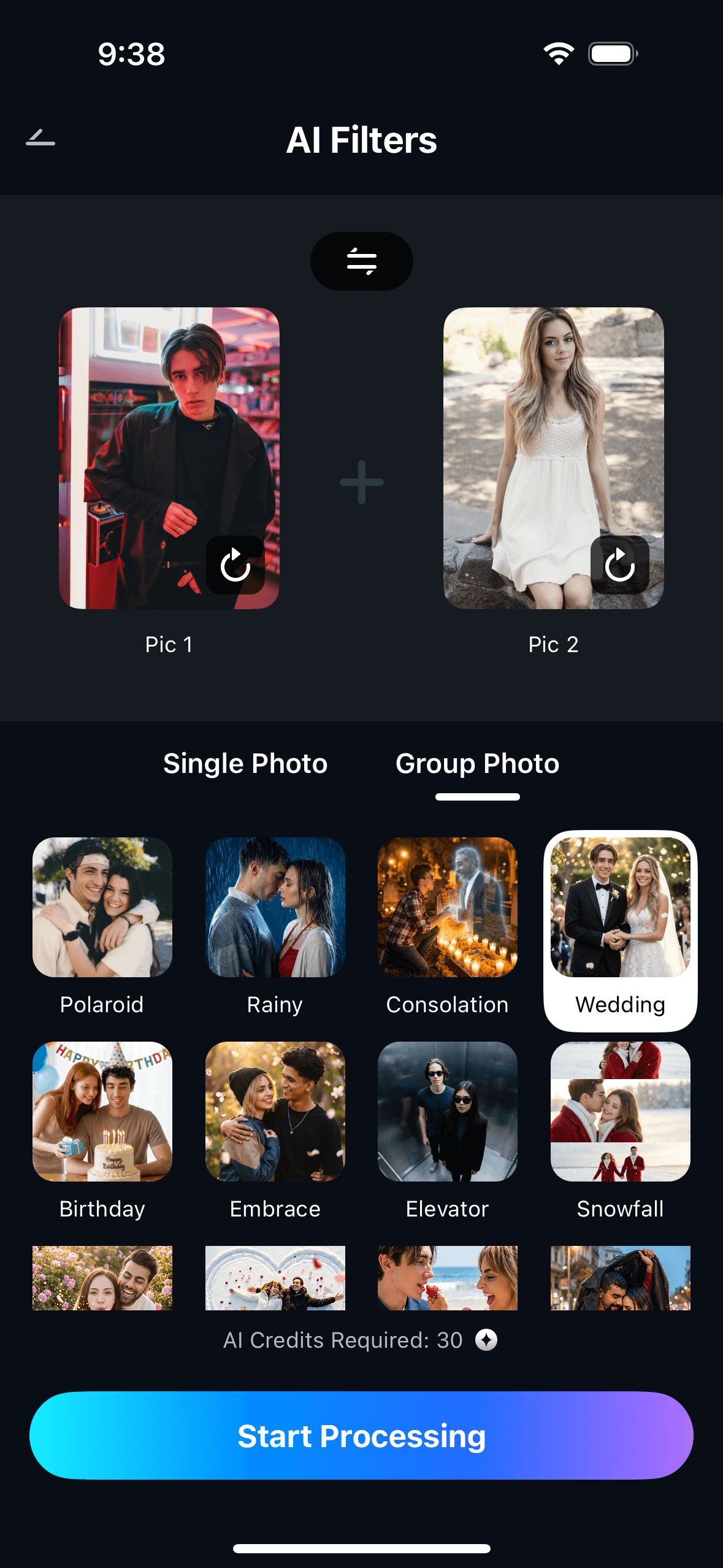
Step 2. Upload the Outfit & Describe the Scene
Tap the second photo slot and select a photo of the outfit you want to try on. This can be a screenshot from any online store, a photo you took of something in a shop, an image from Instagram or Pinterest, or even a flat-lay of clothes from your own wardrobe. Then optionally type a scene description: “outdoor summer wedding”, “business casual office”, or “evening dinner in the city”. Tap Start Processing.
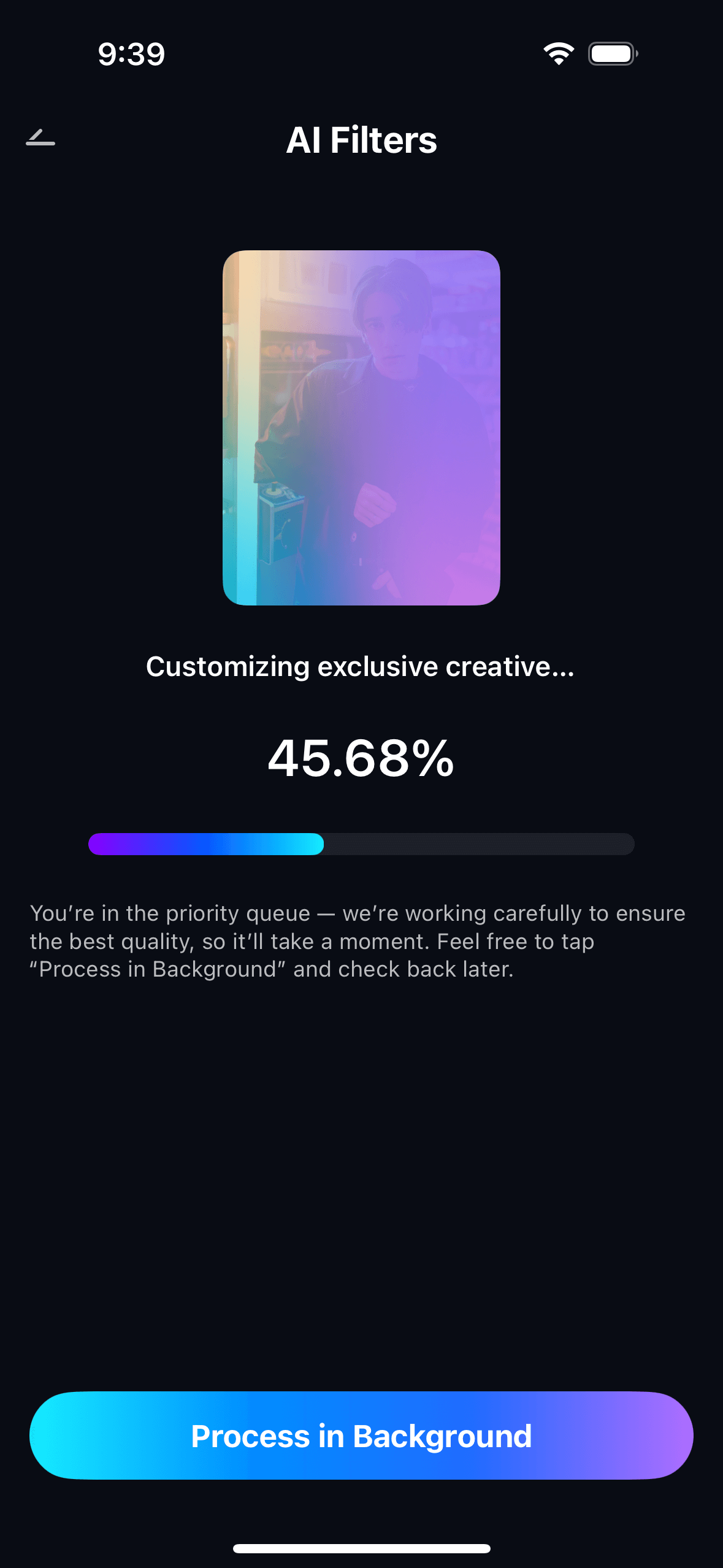
Step 3. Preview, Compare & Save Your Look
Preview the try-on result in full resolution. If you want to test a different outfit or adjust the scene description, go back and swap the garment photo — your portrait stays loaded so there’s no re-uploading. Tap Save to export to your camera roll at full resolution. All results are stored in My Creations so you can compare multiple outfits side by side before making a purchase decision.
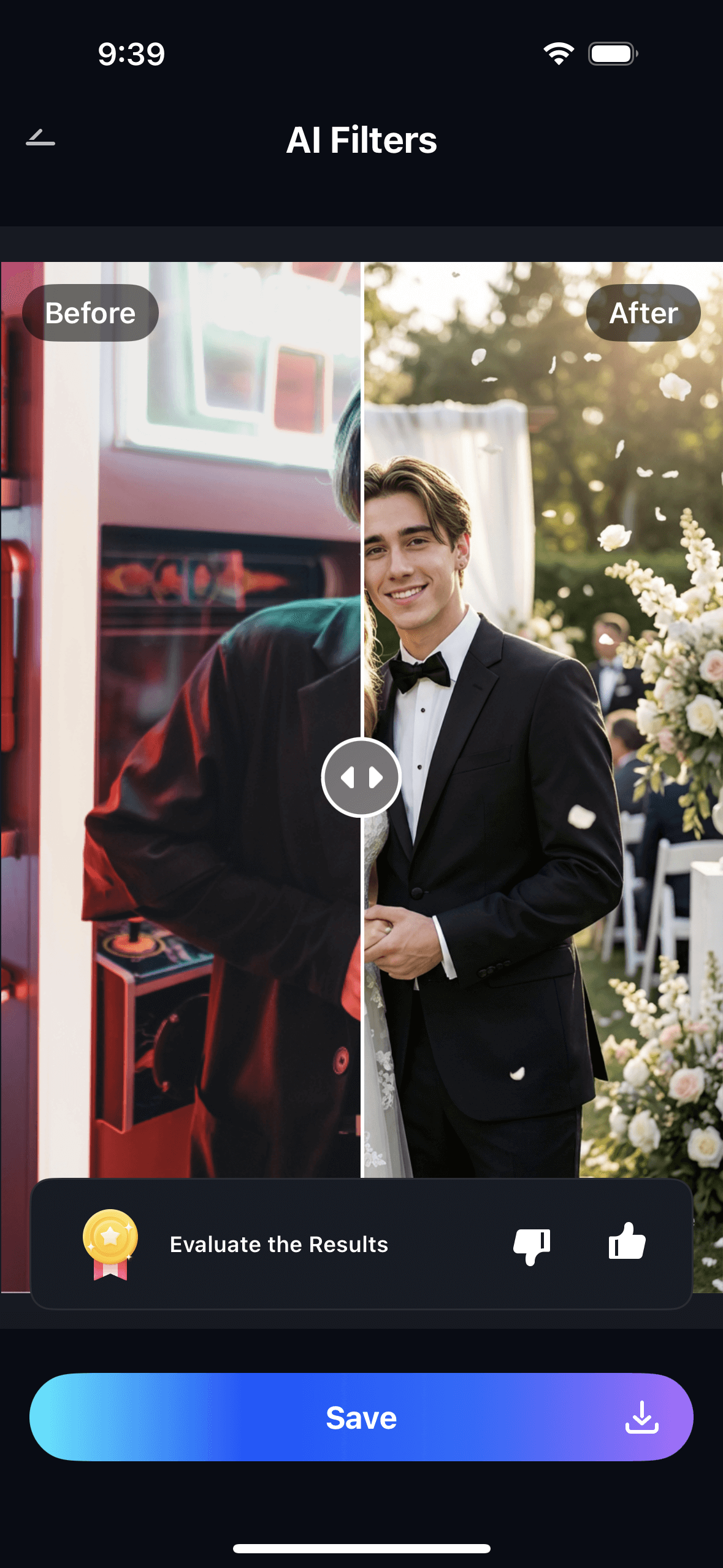
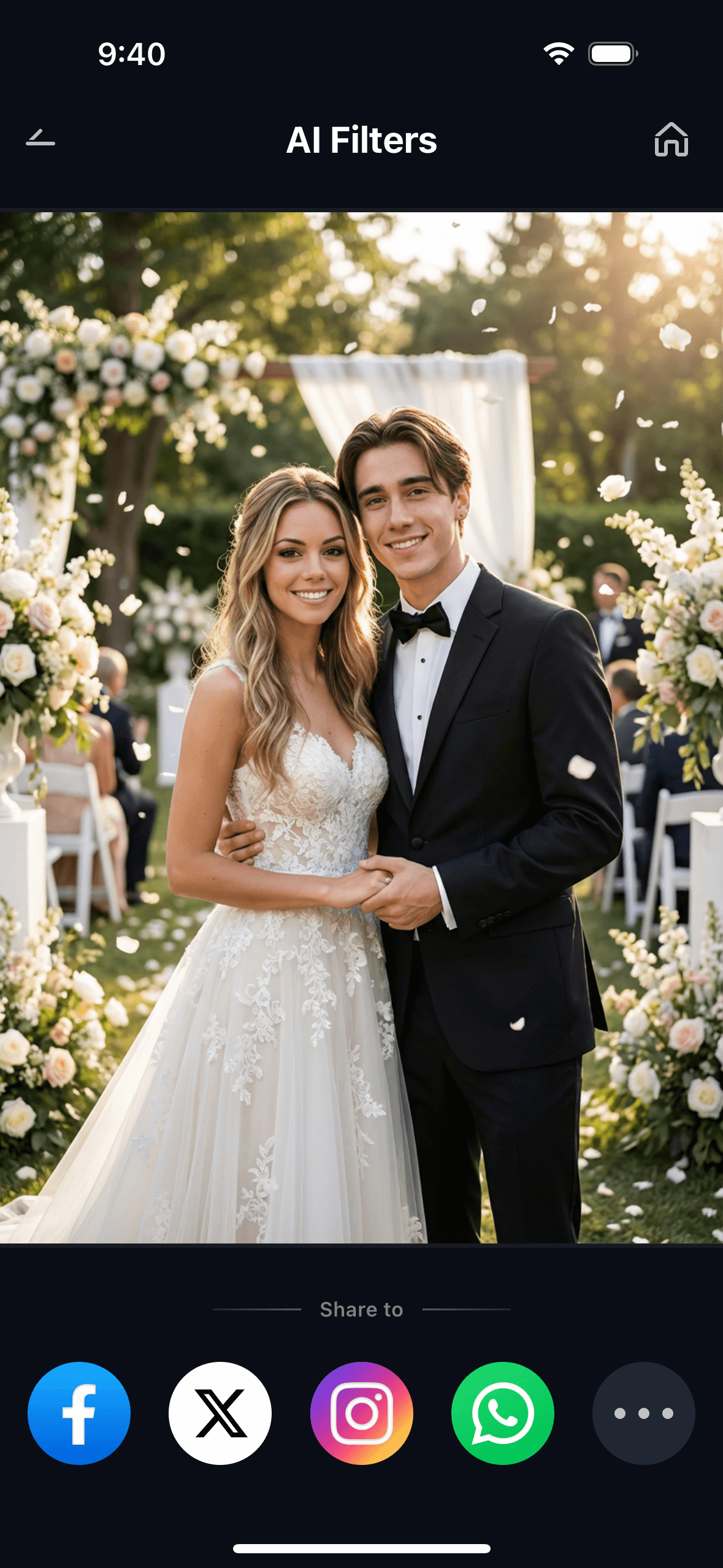
The practical advantage is iteration speed. You can run five different outfits through your portrait photo in under three minutes, save them all, then scroll through and compare them directly. That’s faster than physically trying on two garments in a fitting room — and you can do it from your couch at midnight while the online store is still showing a sale.
Part 3: Three Ways to Use Relumi Virtual Try-On
The Virtual Fashion Try-On feature covers three distinct use cases. Each one solves a different version of the same core problem — not knowing what something will look like on you before you commit to it.
📸 1. See How a Dress Looks on You Before Buying
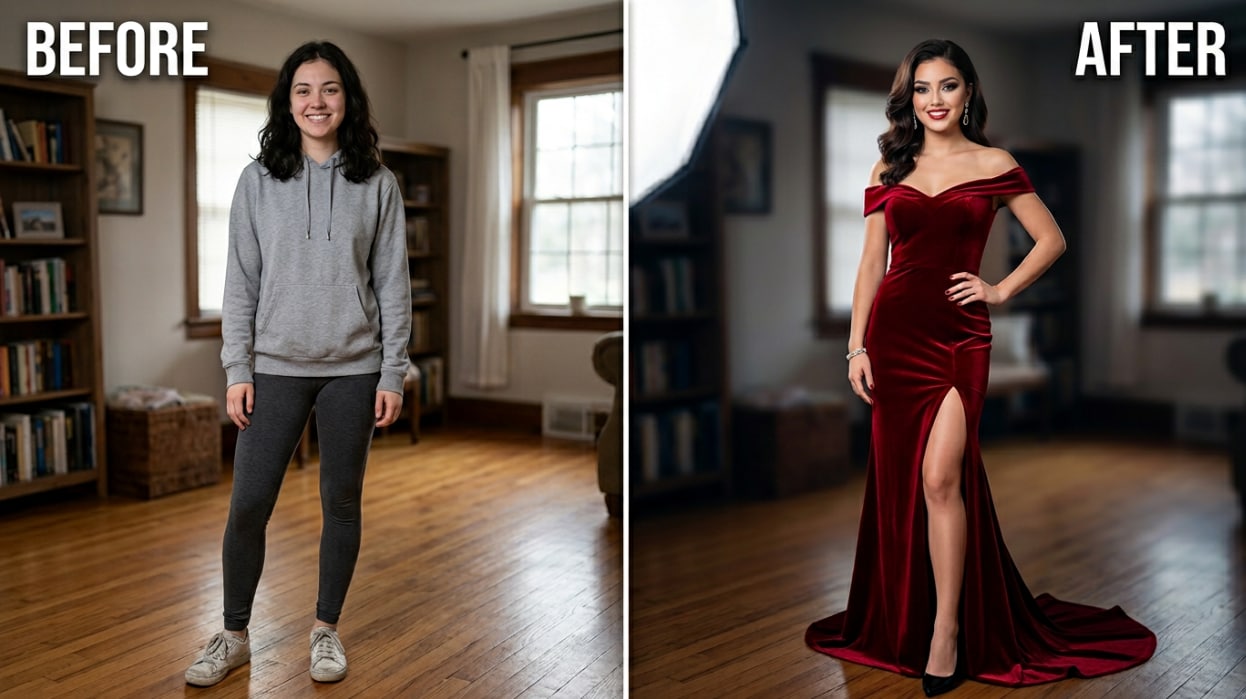
This is the most direct use case: you found something you love online, and you need to know if it will actually work on your body before placing the order. Upload a full-body photo of yourself and a screenshot of the product listing. Relumi generates a photorealistic image of you wearing that specific garment — accounting for how the fabric would fall at your height, your frame, and your proportions.
This is especially useful for occasion-wear — a dress for a wedding, a suit for an interview, a formal gown for a graduation — where a return isn’t practical because you need the item by a specific date. Try-on the item first, see if the silhouette works on you, and order with confidence rather than guessing. You can also use it to check whether a color looks good with your skin tone before committing.
Scene description to try: “outdoor garden wedding, daytime, natural soft light” or “formal dinner event, warm evening lighting.”
🛒 2. Try On Clothes From Any Online Store Photo
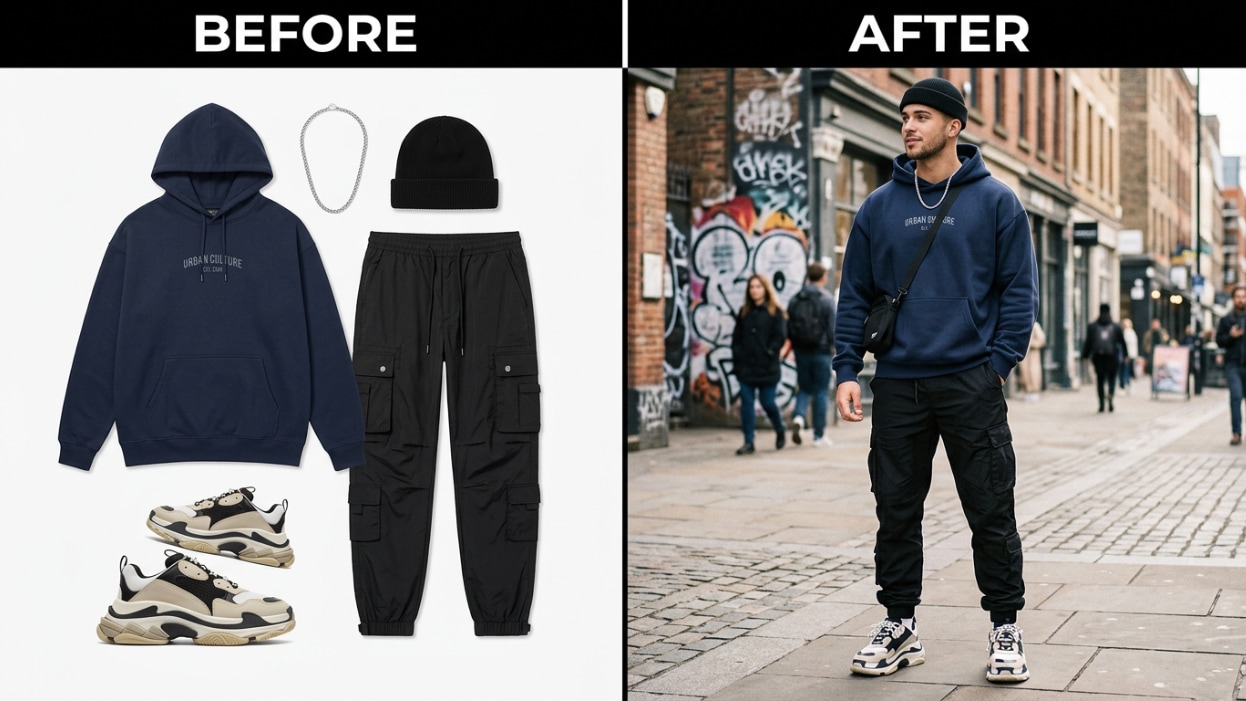
Unlike virtual try-ons built into individual brand websites, Relumi isn’t connected to any store. You can upload a garment photo from Amazon, SHEIN, ASOS, Zara, a local boutique, a thrift store social media post, or a screenshot from TikTok. If you can take a screenshot of it, you can try it on. This makes it genuinely useful for people who shop across multiple platforms rather than sticking to one brand.
This also works for secondhand and vintage shopping. You found a great piece on Depop or at a thrift store but only have one photo taken in mediocre lighting on a flat surface. Upload the garment photo to Relumi along with your own portrait, and see it rendered on your body in proper context. It makes evaluating secondhand purchases much less of a risk, especially when returns aren’t possible.
Scene description to try: “casual city street, natural daylight” or “coffee shop, relaxed daytime atmosphere.”
📷 3. Plan & Compare Multiple Outfit Styles at Once
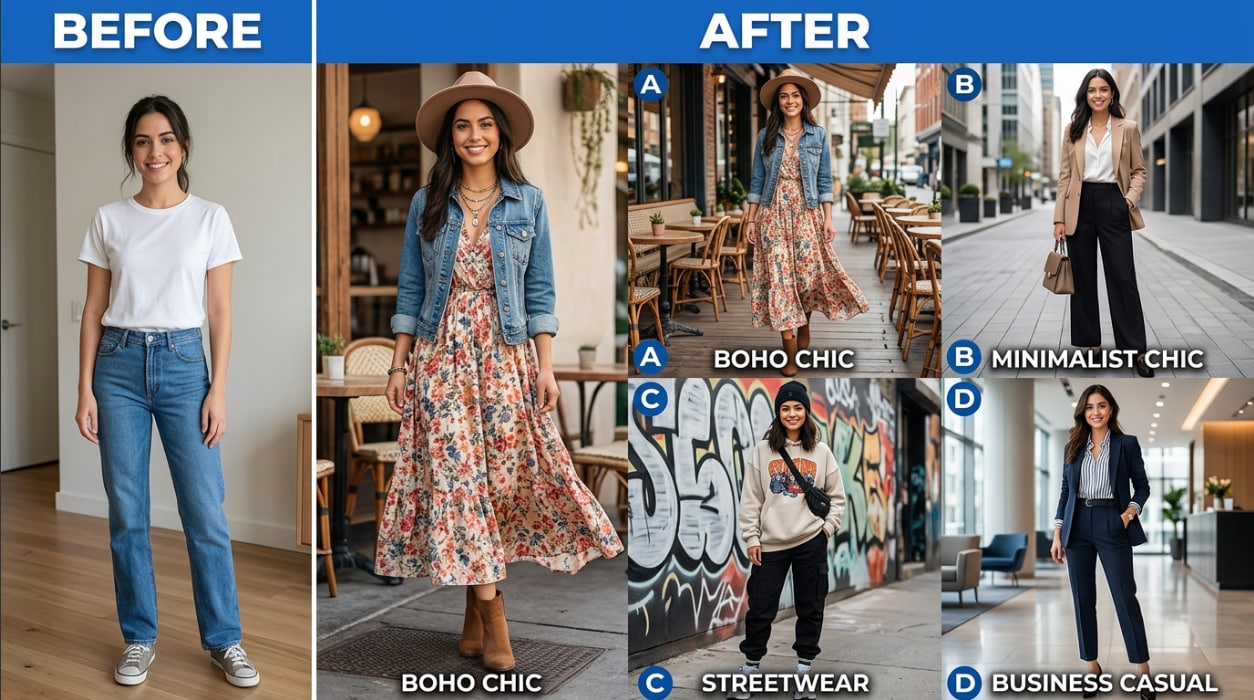
This use case is for anyone who needs to make a decision between multiple outfits — not just a single purchase. Planning what to wear to an event, building a travel capsule wardrobe, preparing content for a fashion account, or deciding which outfit to pack. Upload your portrait once and run different garment photos through it one after another. Save each result. Then compare them all in My Creations at the same time.
This is also useful for fashion content creators who want to plan outfit posts in advance. Instead of physically wearing and photographing multiple outfits, you can generate AI try-on results for different looks, compare the visual output, and decide which to actually shoot. It works as a pre-production planning tool, not a replacement for the real photo — but it saves hours of trial-and-error fitting sessions before you pick up the camera.
Scene description to try: “editorial fashion shoot, clean white studio background” or “street style, golden hour, urban setting.”
Conclusion
Online shopping has always involved a leap of faith. You look at a photo, you make a guess, you order — and half the time, what arrives doesn’t match what you imagined. The problem isn’t the clothes. The problem is that you’ve never been able to see them on your actual body before committing.
Relumi Combine Photo — Virtual Fashion Try-On changes that. Upload your photo. Upload any garment from any source. Get a photorealistic result showing you wearing that outfit — your proportions, your skin tone, your frame — in under 30 seconds. Try five outfits in three minutes. Compare them all before you spend a single dollar.
Try your next outfit before you order it. Your return rate will thank you.
FAQ
-
Will the try-on result show my actual body proportions?
Yes. Relumi uses your uploaded photo as the anchor for body proportions, so the try-on result preserves your actual silhouette — your height ratio, shoulder width, and frame — rather than defaulting to a generic model body. This is the key difference between Relumi and tools that are trained to idealize body shape: the output shows you in the outfit, not a reshaped version of you. -
Can I try on outfits from any store, not just partner brands?
Yes. Relumi accepts any garment photo as input — screenshots from online stores, photos you take in a physical shop, images from social media, or flat-lays from your own wardrobe. There’s no catalog restriction. If you can get a photo of the outfit, you can try it on. -
What kind of photo of myself works best?
A clear, well-lit full-body or three-quarter-body photo gives the best results. Good lighting and a simple background help the AI read your body shape accurately. Selfies work fine — you don’t need a professional photo. Avoid photos where your body is partially obscured by objects, heavy shadows, or very busy backgrounds. -
Can I try on multiple outfits from the same photo?
Yes. Once your portrait is loaded, you can run different garment photos through it without re-uploading. Each generation takes about 15–30 seconds. All results are saved in My Creations so you can scroll through and compare multiple looks at the same time before deciding which to buy or wear. -
Does it work for tops only, or full outfits?
The Virtual Fashion Try-On feature works with both individual garments (tops, dresses, jackets, trousers) and full outfit photos. For best results with tops, use a photo that shows your upper body clearly. For full outfits, a full-body portrait gives the AI the most accurate reference for how the complete look will fit. -
Is the Virtual Fashion Try-On feature free?
Yes. The core Virtual Fashion Try-On feature is available on Relumi’s free tier for iOS and Android. Upload your photo, upload the garment, generate the try-on result, and save it at full resolution — no subscription required to try it. Advanced options and higher export resolutions are available on the paid plan.



