
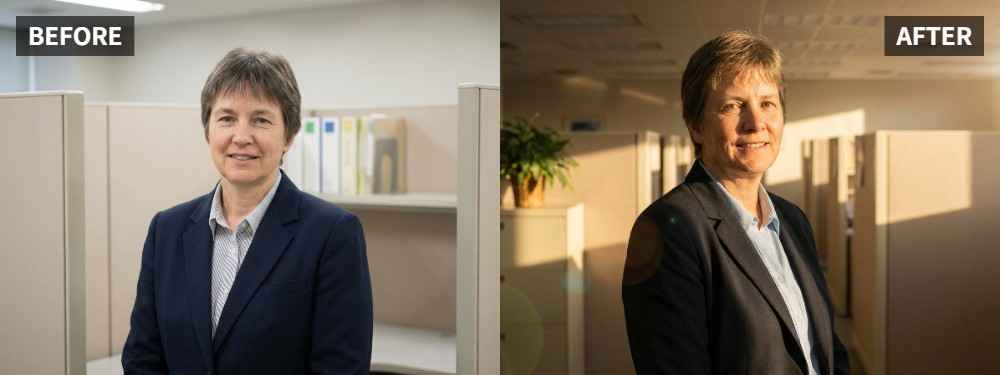
 TL;DR:
To fix flat or overly cool office headshots while maintaining a professional appearance, use the Photo Lighting Enhancer in the Relumi App and select Scene Retake > Golden Hour to introduce natural, subtle warmth.
● This feature is best applied to clean, already-usable business portraits that suffer from dull skin tones or harsh overhead indoor lighting, rather than photos needing a dramatic makeover.
● In an office context, the setting functions strictly as a soft facial light correction rather than a heavy sunset filter, ensuring the portrait remains credible for corporate profiles and team pages.
● Before saving the relit image, verify that the warmth remains subtle, the face avoids looking over-edited, and the subject retains their natural identity.
Ask AI for a summary
 ChatGPT
 Perplexity
 Gemini
 Claude
 Grok
Grok
Key Takeaway: An office portrait does not have to stay cool, plain, or overly corporate. In the Relumi App, Photo Lighting Enhancer with Scene Retake > Golden Hour can add softer warmth and a more approachable look while still keeping the portrait professional.
The official Relumi Lighting Enhancer page explicitly supports office profile photo lighting as one of its key people-photo scenarios. That makes Golden Hour a useful option when the original office portrait feels too cold or too flat, but you still want the final result to stay realistic and work-friendly.
In this article
Part 1: Why Office Portraits Often Feel Too Plain
Office portraits often suffer from a simple problem: the person looks technically visible, but not especially flattering. Flat overhead light, cool indoor color, or stiff lighting can make the face look wider, duller, or less lively than it should. In discussions about professional photos that feel wrong, people often point to flat lighting as one of the main reasons the result looks less flattering than real life. Reddit discussion on flat professional headshots
Common Signs
- The portrait looks too cool or too corporate
- The face feels flat instead of softly shaped
- Skin tone looks dull under office light
- The photo is clear, but not very flattering
- The result feels usable, but not inviting
What People Usually Want
- A more approachable portrait
- Softer warmth without losing professionalism
- Better face light without obvious editing
- A portrait that still works for profiles and work use
- A natural golden-hour feel instead of a filter look
What most people want is not a dramatic makeover. They want a more flattering and more human version of the same portrait.
Part 2: How to Use Relumi Golden Hour
The Relumi App describes AI Retake as a way to rescue a portrait that would have been great with just a bit more light. That makes Golden Hour useful when the office portrait already works, but still feels too plain, too cool, or too stiff.


Relumi Lighting Enhancer
Retake photo lighting naturally with AI-powered scene relighting.

 Balance harsh facial shadows without flattening the portrait
-
Improve hard light, patchy light, and low-visibility street portraits naturally
-
Keep urban mood while making the subject easier to see
-
No editing skills required — upload, relight, preview, and save
Step 1: Add Your Office Portrait
Open the Relumi App, go to Photo Lighting Enhancer, and upload the office portrait that feels too flat, too cool, or too plain.

Step 2: Select Golden Hour
Choose Scene Retake > Golden Hour. This helps introduce softer warmth and more flattering face light while keeping the portrait realistic.

Step 3: Preview and Save
Save the result if the portrait looks more approachable, the face feels better shaped, and the image still looks professional enough for work use.

Part 3: When Golden Hour Works Best
Golden Hour works best on office portraits that already look clean and usable, but feel too cold or too flat to be flattering. It is especially helpful for profile photos, team pages, business portraits, and work-friendly headshots that need warmth without losing credibility.
Ideal Scenarios
- Office portraits with cool indoor lighting
- Professional headshots that feel too flat
- Profile photos that look stiff or plain
- Business portraits that need more warmth and approachability
- Clean office images that are usable but not flattering enough
What a Good Result Should Look Like
- The face looks more flattering, not more filtered
- Warmth feels subtle and natural
- The portrait still looks professional
- The person feels more approachable and alive
Quick Checklist Before Saving
| Check | What to ask |
|---|---|
| Professionalism | Would this still work for office or profile use? |
| Warmth | Does the portrait feel more flattering without looking over-edited? |
| Natural Look | Does the person still look like themselves? |
If the answer is yes to all three, the office portrait is probably ready.
Conclusion
An office portrait does not have to stay plain just because it needs to remain professional. If the original image is clean but not flattering enough, Relumi Lighting Enhancer with Scene Retake > Golden Hour can add softer warmth and better face light while keeping the result realistic and work-friendly.
FAQ
-
Can Golden Hour still work for an office portrait?
Yes. In this context, it works as a softer, warmer lighting option rather than a dramatic sunset effect. -
Will the result still look professional?
It should if the edit stays subtle. The goal is to make the portrait more flattering, not less credible. -
Is this only for formal headshots?
No. It can also help on profile photos, work-page portraits, and casual office portraits that need a more polished feel.



