
 TL;DR:
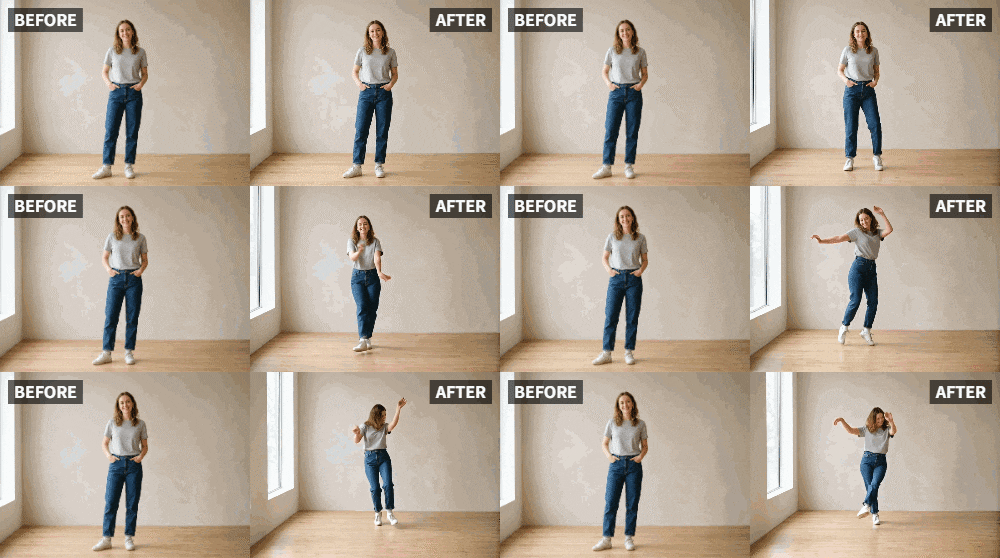
Parents can use the Relumi app's Dance preset to convert clear, front-facing static photos of their children into animated dance videos.
● The AI supports old, faded, and black-and-white images, and will automatically animate every child detected within a single group or sibling photo.
● The tool is accessed through the Photo Animation menu and can be used alongside the Clap preset to animate family reaction pictures for a sequence.
● When processing photos of very young toddlers, the generated animation specifically mimics a natural, wobbly toddler movement rather than a standard dance routine.
Ask AI for a summary
 ChatGPT
 Perplexity
 Gemini
 Claude
 Grok
Grok
Kids are naturally funny, energetic, and full of personality. But capturing that perfect moment on video is a challenge. By the time you get your phone out, the spontaneous dance party is over. You're left with a great photo of them looking cute, but the hilarious moment is gone.
Relumi's "Dance" feature is the perfect tool to turn those cute, static photos into the hilarious, energetic videos they deserve to be. Make your toddler's photo break into a funky dance. Animate your tween's school picture to bust a move. It's a surefire way to create laughter and memories that the whole family will treasure.
In this article
Part 1: The Quest for Funny, Shareable Kids' Content
On parenting forums and subreddits like r/daddit and r/mommit, parents are always sharing funny moments and looking for new ways to celebrate their kids' personalities. Photos are great, but video captures the energy. However, filming constantly isn't always possible.
AI animation fills this gap. It allows parents to create fun, dynamic content from the photos they already have. A "dancing" kid photo is an instant hit in family group chats and on personal social media pages. It's a way to celebrate your child's inherent silliness and joy, even when you missed the live performance .
Part 2: How to Create a Hilarious "Talent Show" Video for Your Kid


Relumi AI Photo Animation
Bring old photos to life with AI-powered animation.

 Preset motion styles — Wave, Dance, Clap, Cheers & more
-
Works on old, faded, and black-and-white photos
-
No editing skills required — generate in seconds
-
One tap turns any still image into a moving memory.
Creating this fun content is quick and easy, and the result will be priceless.
Step 1: Choose a Great Photo of Your Child
Select a clear, front-facing photo of your child. A school picture, a candid shot of them laughing, or even a photo of them in a funny costume all work wonderfully. The clearer the image, the better.

Step 2: Upload to Relumi and Apply the "Dance" Preset
Open the Relumi app, go to Photo Animation, and select the "Dance" preset. The AI will generate a short video of your child dancing with joyful, rhythmic movement. Seeing their own image dance is a magical and hilarious experience for kids.

Step 3: Build Your "Talent Show" Video
This is where you get creative.
- Introduce the "Act": Use a simple video editor to create a title card: "And now, the incredible [Child's Name] will perform a stunning dance!"
- The Performance: Cut to your animated dancing child clip.
- The Applause: End with a photo of your family clapping (which you could also animate with Relumi's "Clap" feature!).
- Add Music: Overlay with funny circus music, a talent show theme, or their favorite song.

Part 3: Other Fun Ways to Use Dancing Kid Photos
This idea can be used for many occasions and pure, silly fun.
- Birthday Greetings: Animate a photo of the birthday child dancing and use it in a birthday video or social media post.
- Celebrating Milestones: Did they lose a tooth? Learn to ride a bike? Get a good report card? Celebrate with a dancing kid video!
- Funny Reactions: In family group chats, drop an animated dancing photo of your kid as a funny reaction to a piece of news.
- End-of-Year School Recap: Compile a video of your child's school year, using animated dancing photos of them to add energy and humor between the real video clips.
- Grandma and Grandpa Surprises: Send an animated dancing photo of the grandkids to grandparents. It's guaranteed to make their day.
Conclusion
Kids are a source of endless joy and laughter. With Relumi's "Dance" feature, you can amplify that joy, turning their cutest photos into hilarious, shareable videos that capture their playful spirit. Create a "talent show," celebrate a milestone, or just make them giggle—the possibilities for fun are endless.
Frequently Asked Questions
-
Will the dance look natural on a very young toddler?
Yes, and it's absolutely adorable. The AI-generated movement will look like a cute, wobbly toddler dance. -
Can I use a photo of my child with a sibling or friend?
Yes! A photo of siblings or friends dancing together is doubly hilarious and heartwarming. The AI will animate all the kids it detects. -
How can I make sure the video is safe to share?
You control your content. Share it only in private family groups or on your personal, private social media accounts if you're concerned about privacy. -
What's the best way to show the video to my child?
Show it to them on your phone or tablet. Their reaction to seeing themselves dance will be just as funny as the video itself. It's a great way to get them laughing and engaged.



