
 TL;DR:
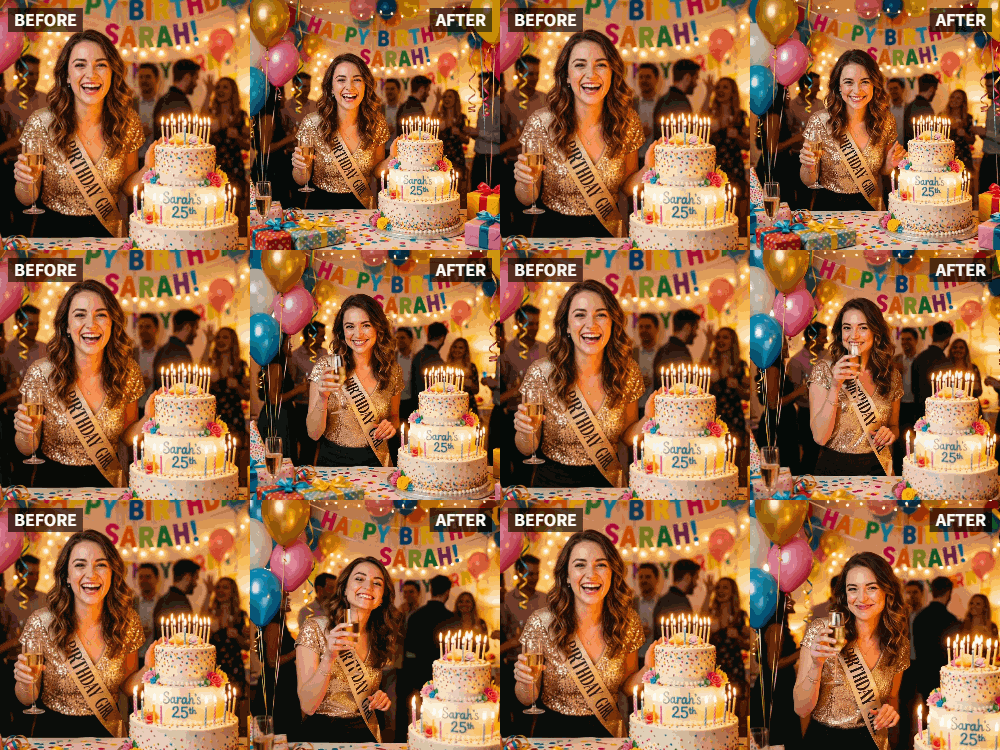
Transform a static birthday photo into a dynamic video toast by applying the "Cheers" preset within the Relumi app's Photo Animation tool.
● While ideal for photos of people holding drinks, the AI automatically generates a natural glass-raising gesture for human subjects with empty hands.
● The "Cheers" preset is strictly optimized for people; animating an inanimate object like a birthday cake requires using the "Wave" preset instead.
● Relumi only generates the visual motion, meaning you must export the recommended 5-10 second video loop to a separate editor to add music, text, or voiceovers.
Ask AI for a summary
 ChatGPT
 Perplexity
 Gemini
 Claude
 Grok
Grok
It's someone's birthday. You have a great photo of them from last year's party, holding a drink, laughing, in the middle of the celebration. You want to post a "Happy Birthday" message, but a static photo feels too quiet for such a joyful occasion. You want to capture the spirit of the day—the toasts, the cheers, the love.
Relumi's "Cheers" feature is the perfect solution. It takes that birthday portrait and brings it to life, making the birthday person (or the whole group) raise their glass in a celebratory toast. It's the digital equivalent of a room full of people shouting "Happy Birthday!"
In this article
Part 1: The Challenge of the Static Birthday Post
On social media, birthday posts are a daily occurrence. A photo with a "Happy Birthday" caption is the standard. It's nice, but it's also forgettable. In a sea of similar posts, how do you make your message stand out?
The answer is motion. Video content consistently outperforms static images . But not everyone has video footage from the birthday person's party. What they do have are photos. Relumi's Cheers feature bridges that gap, transforming a standard birthday snap into a dynamic, celebratory video that feels as joyful as the day itself.
Part 2: How to Create a Birthday Cheers Video in Minutes


Relumi AI Photo Animation
Bring old photos to life with AI-powered animation.

 Preset motion styles — Wave, Dance, Clap, Cheers & more
-
Works on old, faded, and black-and-white photos
-
No editing skills required — generate in seconds
-
One tap turns any still image into a moving memory.
Creating a standout birthday post is quick and easy with Relumi.
Step 1: Choose the Perfect Birthday Photo
Select a clear photo of the birthday person. A shot where they are holding a drink and smiling is ideal, but any clear portrait will work. If you have a group shot of friends toasting them, even better.

Step 2: Upload to Relumi and Apply the "Cheers" Preset
Open the Relumi app, go to Photo Animation, and select the "Cheers" preset. The AI will generate a short video where the subject (or subjects) raise their glasses in a joyful toast.

Step 3: Customize and Share Your Birthday Greeting
Export the clip. Now, you have a unique birthday video to share.
- Social Media Post: Post it on their Facebook wall or Instagram with a heartfelt caption. The animated toast will make your message the most memorable one they receive.
- Group Chat Surprise: Drop the video in a group chat with friends right as everyone is sending their birthday wishes.
- Add Text and Music: Use a simple editor to add "Happy Birthday, [Name]!" and overlay a fun, upbeat song.

Part 3: Creative Birthday Uses for the Cheers Feature
This idea can be adapted for many birthday-related moments.
- Countdown to a Milestone Birthday: In the days leading up to a 21st, 30th, or 50th birthday, post animated "cheers" photos from throughout the person's life.
- Throwback Birthday Posts: Find an old photo from their childhood where they're holding a juice box or a soda. Animate it with the Cheers preset for a funny, nostalgic twist.
- Virtual Birthday Party Invitations: Create a digital invitation video that ends with an animated photo of the guest of honor toasting the recipient and saying "Hope you can make it!" .
- Thank You Videos: After the party, send a thank-you video to guests that includes an animated clip of the birthday person toasting to their friends.
Conclusion
A birthday is a celebration, and your social media post should feel like one. By using Relumi's "Cheers" feature, you transform a standard photo into a living, joyful toast that truly honors the person and the occasion. It's the birthday message everyone will remember.
Frequently Asked Questions
-
What if the birthday photo doesn't show anyone holding a drink?
The "Cheers" preset is designed to work with the available visual information. Even if hands are empty, the AI will generate a natural "raising" gesture that still conveys a celebratory toast. -
Can I animate a photo of just the birthday cake?
The "Cheers" feature is optimized for people. For a cake, the "Wave" preset might create a nice, subtle movement. For people celebrating with cake, "Cheers" is perfect. -
How long should the final birthday video be?
For a social media post, a 5-10 second loop is perfect. For a longer tribute, you can compile multiple animated clips. -
Can I add a voiceover saying "Happy Birthday"?
Yes. Export the animated clip and use any video editor to add a voiceover, music, or sound effects.



