
 TL;DR:
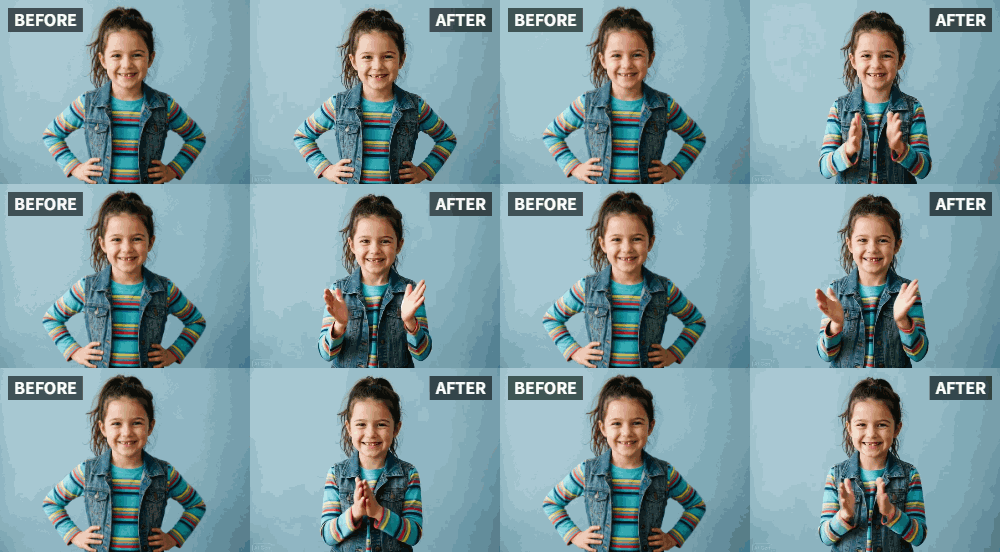
Parents can build a child's confidence by using Relumi's AI Photo Animation "Clap" preset to turn a static picture into a personalized video of the child applauding their own achievements.
● Use a clear, smiling solo photo of the child, as uploading group or pet pictures causes the AI to animate all faces and dilute the specific encouragement message.
● Generate the animation by uploading the image to Relumi and applying the "Clap" preset, then optionally use an external video editor to add congratulatory voiceovers or text overlays.
● Introduce the video to the child as a fun magic trick to ensure the animation feels natural rather than creepy, displaying it directly on a mobile device or storing it in a private folder.
Ask AI for a summary
 ChatGPT
 Perplexity
 Gemini
 Claude
 Grok
Grok
Every parent, teacher, and caregiver knows the power of positive reinforcement. A "Good job!" or "I'm so proud of you!" can light up a child's world. But in our busy lives, we're not always there in person to give that applause when a child learns a new skill, brings home a great grade, or simply tries their hardest.
Relumi's "Clap" feature offers a unique and heartwarming solution. By animating a photo of the child themselves, you can create a powerful, personalized video message where they seem to be applauding their own accomplishment. It's a digital high-five that boosts confidence and makes them feel seen and celebrated .
In this article
Part 1: The Need for Tangible Encouragement
On parenting forums and in child development discussions, the concept of "external validation" is often debated. While internal motivation is the ultimate goal, tangible, external praise is crucial for building a child's self-esteem, especially in their early years.
A parent might say "Well done!" a hundred times a day, but a child might not always feel it. Creating a short, fun video where their own face is clapping for them can make that praise feel more concrete, more special, and more memorable. It turns your words into a visual, shareable celebration of them .
Part 2: How to Create a "You Did It!" Encouragement Video
Creating these little video boosts is quick and easy, making them a perfect tool for busy parents.


Relumi AI Photo Animation
Bring old photos to life with AI-powered animation.

 Preset motion styles — Wave, Dance, Clap, Cheers & more
-
Works on old, faded, and black-and-white photos
-
No editing skills required — generate in seconds
-
One tap turns any still image into a moving memory.
Step 1: Choose a Happy Photo of Your Child
Select a clear, smiling photo of your child. It could be from a recent happy moment, their school picture, or even a candid shot. The key is to have a photo where their face is bright and visible.

Step 2: Upload to Relumi and Apply the "Clap" Preset
Open Relumi, go to Photo Animation, and select the "Clap" preset. The AI will transform your child's still photo into a short video of them clapping and celebrating. Seeing themselves "applaud" is a magical experience for a child.

Step 3: Personalize and Share the Moment
You can keep the video simple or add a few extra touches.
- Add a Voiceover: Use a simple video editor to record yourself saying, "I'm so proud of you for [the accomplishment]!" before the animated clapping starts.
- Add Text: Overlay text on the video like "Great job on your spelling test!" or "Way to go, superstar!"
- Send It: Share the video in a text message, or show it to them on your phone as a special surprise when they get home from school.

Part 3: Creative Ways to Use Encouragement Videos for Kids
These videos can be used for all sorts of milestones and everyday wins.
- Learning a New Skill: Did your child finally tie their shoes or ride a bike without training wheels? Send them an animated clapping video to celebrate their persistence.
- Good Deeds: If you hear that your child was especially kind or helpful at school, surprise them with a video of themselves clapping to reinforce that positive behavior.
- Overcoming Fears: After a doctor's appointment or a brave moment, a quick "clapping you" video can help them feel proud of their courage.
- A "Just Because" Surprise: You don't need a reason. A surprise "I'm so proud you're you!" video can make any ordinary day special for a child.
Conclusion
A child's confidence is built one "good job" at a time. By using Relumi's "Clap" feature to create personalized encouragement videos, you're giving them a powerful, visual reminder of their own accomplishments. It's a simple, modern tool for old-fashioned love and support that will make them feel like the superstar they are.
Frequently Asked Questions
-
Is it appropriate to use this for very young children or toddlers?
Absolutely. Toddlers love seeing themselves, and the animation will fascinate them. It's a positive and engaging way to reinforce good behavior and celebrate their milestones. -
Can I use a photo of my child with a pet or sibling?
Yes, but for a focused "encouragement" video, a solo photo of the child works best to keep the attention entirely on them. If you use a group photo, the AI will animate everyone, which could dilute the message. -
How can I make sure the video doesn't feel "creepy" to a child?
The animation is designed to be subtle and natural, not like a cartoon or horror effect. Framing it as a fun, magic trick—"Look, you're clapping for yourself!"—makes it an exciting and positive experience. -
What's the best way to share these videos with my child?
Showing it to them directly on your phone or tablet is the most impactful. You can also create a private folder of these videos and watch them together as a "brag book" to boost their confidence on tougher days.



