AZMovies became popular for quick, free movie streaming, but constant domain changes, aggressive pop-ups, and legal uncertainty make many viewers look for safer options. Instead of chasing unstable clones, you can move to mainstream azmovies alternatives that are fully licensed, easier to access, and less likely to expose you to malware or tracking scripts.
Well-known sites like azmovies such as Tubi, Pluto TV, Crackle, Peacock, The Roku Channel, and Plex give you free or low-cost access to large movie catalogs with official apps on smart TVs, phones, and streaming sticks. Below you will see how each azmovies replacement compares, which one fits different viewing habits, and how to improve low-quality downloads with AI video enhancement.
Enhance Low-Quality Videos with Repairit
 Security Verified. Improve blurry clips, recordings, highlights, and saved videos with AI.
In this article
Side-by-Side Comparison of AZMovies Alternatives
| Platform | Best For | Cost | What Stands Out | Main Limitation | Safety Tip |
|---|---|---|---|---|---|
| Tubi | Free on-demand movies and TV with wide device support | Free with ads | Huge licensed library and smooth apps on most devices | Ads interrupt playback and some new releases are missing | Install only the official app from your device store to avoid clones. |
| Pluto TV | Live TV-style channels plus free movies | Free with ads | Cable-like live channels alongside on-demand catalogs | Channel grid can make finding specific movies harder | Watch via the official website or app, not embedded third-party streams. |
| Crackle | Free movies and original series | Free with ads | Curated selection of cult titles and exclusive originals | Smaller library and regional availability differences | Protect your account with a strong, unique password. |
| Peacock | Free and premium Hollywood movies plus current TV | Freemium | Mix of free content, new movies, NBC shows, and some sports | Many top titles sit behind the paid tier | Enable two-factor authentication and pay only through official billing. |
| The Roku Channel | Roku owners who want free streaming hubs | Free with ads | Deep Roku integration and a range of on-demand and live content | Works best on Roku hardware and not available everywhere | Keep Roku firmware updated and review channel permissions. |
| Plex | Combining free streaming with personal media | Freemium | Ad-supported movies plus powerful personal media server | Server setup and management can be complex for beginners | Secure remote access with strong credentials and trusted sharing. |
6 Best AZMovies Alternatives
Alternative 1. Tubi
Tubi is a fully legal, ad-supported streaming service that offers thousands of movies and shows, making it one of the easiest azmovies alternatives to switch to. Unlike AZMovies, Tubi runs on stable, official apps across smart TVs, consoles, and mobile devices, so you are not constantly hunting for new domains. It is a strong azmovies replacement if you want recognizable titles, safer access, and reliable HD playback without entering payment details.
Pros
Huge free, ad-supported catalog with mainstream and niche films.
Available on most smart TVs, game consoles, and mobile platforms.
No credit card required to create an account or start watching.
Cons
Frequent ad breaks can disrupt longer movies.
Some regions have a more limited selection than the US catalog.
Alternative 2. Pluto TV
Pluto TV delivers free streaming through a grid of live channels plus on-demand movies, offering a different feel from AZMovies while still satisfying casual viewing. As one of the top sites like azmovies, it lets you jump into themed movie channels or browse a library without signing up or paying. Because Pluto TV is an official, ad-supported platform, it is far safer and more stable than chasing AZMovies mirrors that may host intrusive ads or harmful scripts.
Pros
Offers hundreds of live channels plus a growing on-demand movie section.
No account needed, so you can start watching instantly.
Official apps are available for major smart TVs, sticks, and mobile devices.
Cons
Channel-style layout can feel cluttered and slow for finding specific movies.
Movie catalog is smaller and rotates more often than some competitors.
Alternative 3. Crackle
Crackle is a free, ad-supported streaming service that focuses on movies, classic TV, and original series, making it a compelling azmovies alternative for fans of cult and offbeat content. In contrast to AZMovies, Crackle operates with proper licensing and consistent domains, so you are not dealing with suspicious redirects or pop-under ads. It is a good option if you want safe movie streaming with a curated feel instead of scraping random links from unofficial sources.
Pros
Curated catalog with cult classics, indie films, and originals you may not see elsewhere.
Completely free to use, supported only by ads.
Account lets you sync watch progress across multiple devices.
Cons
Smaller overall catalog than bigger free services.
Content availability and specific titles vary significantly by region.
Alternative 4. Peacock
Peacock, NBCUniversal's streaming service, blends a free ad-supported tier with paid plans that unlock newer movies, big TV shows, and live sports, making it a polished azmovies replacement. Compared to AZMovies, Peacock gives you a legal path to watch hd movies online with modern apps, profiles, and watchlists that work reliably across devices. It is ideal if you want safer access to Hollywood hits and network TV without worrying about unstable domains or takedowns.
Pros
Free tier plus affordable paid plans for newer and premium titles.
Strong catalog from NBC, Universal, and partner studios.
Modern interface with user profiles, recommendations, and watchlists.
Cons
Many of the best new movies and shows require a paid subscription.
Service is limited or unavailable in some countries without workarounds.
Alternative 5. The Roku Channel
The Roku Channel is Roku's own free streaming hub, offering movies, TV shows, live channels, and premium add-ons that integrate tightly with Roku devices. For AZMovies users who already own a Roku, it is a convenient azmovies alternative that avoids sketchy pop-ups while still giving you plenty of ad-supported entertainment. Because it is part of Roku's official ecosystem, it delivers more stable, trustworthy free movie streaming than AZMovies clones.
Pros
Deep integration with Roku hardware and home screen.
Blend of on-demand movies, TV shows, news, and live channels.
Free to watch with simple navigation and parental controls.
Cons
Best experience is limited to users with Roku devices or supported regions.
Catalog can feel more limited compared with standalone majors like Tubi.
Alternative 6. Plex
Plex is a hybrid platform that combines free, ad-supported streaming channels with powerful media server features for organizing your own collection. As a legal movie streaming site and personal hub, it offers a safer route than AZMovies, while still letting you enjoy on-demand titles and live channels. It is a flexible azmovies alternative if you like the idea of centralizing your media and using official apps instead of unreliable third-party streaming links.
Pros
Offers free ad-supported movies, shows, and live TV channels.
Media server lets you stream your own downloaded or ripped content anywhere.
Clients available on nearly every platform, from phones to smart TVs.
Cons
Initial server setup and maintenance can be confusing for beginners.
Some advanced features and mobile sync require a paid Plex Pass.
How Repairit Video Enhancer Improves Saved Video Quality
If you have downloaded movies or clips from AZMovies or its azmovies alternatives and the files look blurry, grainy, or low-resolution, Repairit Video Enhancer can use AI to upscale and clean them so they look closer to true HD on any screen.
Key features of Repairit Video Enhancer
- AI-powered upscaling boosts low-resolution videos to higher definitions while keeping details natural.
- Smart noise reduction and deblurring clean compression artifacts, grain, and motion blur from streamed or recorded files.
- One-click enhancement supports batch processing so you can upgrade multiple saved movies efficiently.
Simple steps to enhance your videos
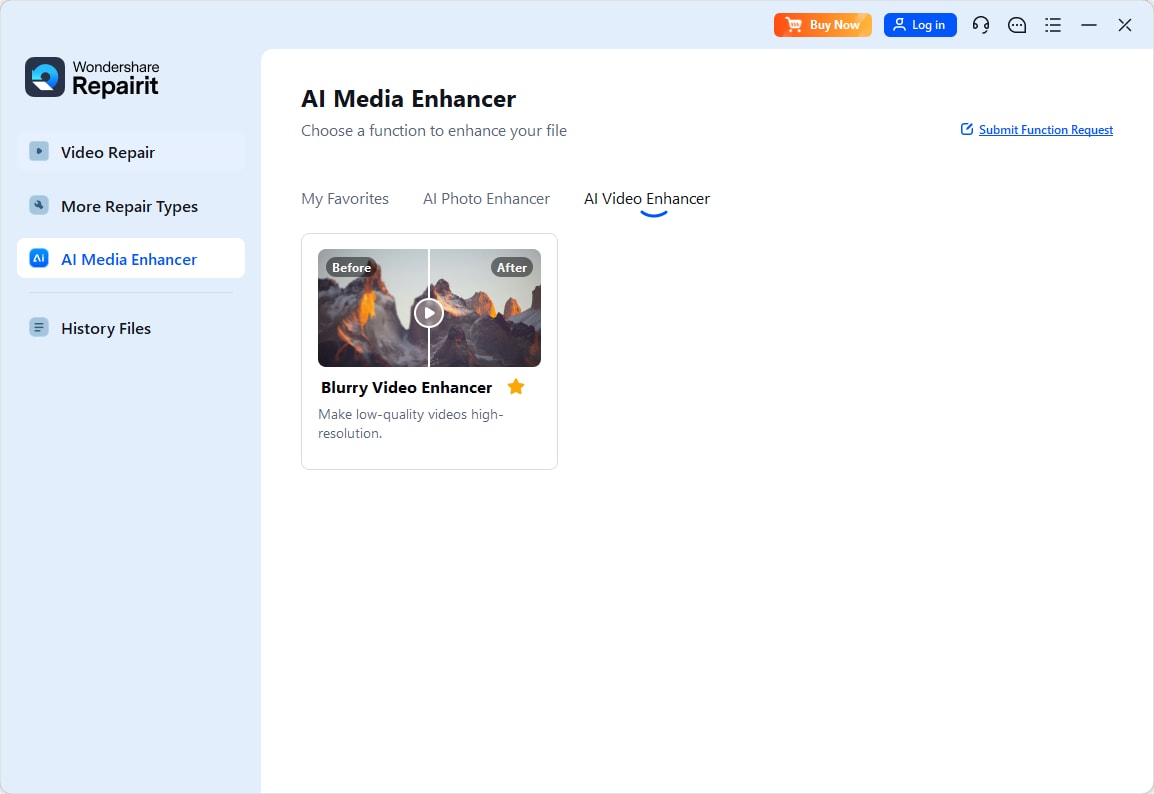
Step 1. Import videos to start AI video enhancement
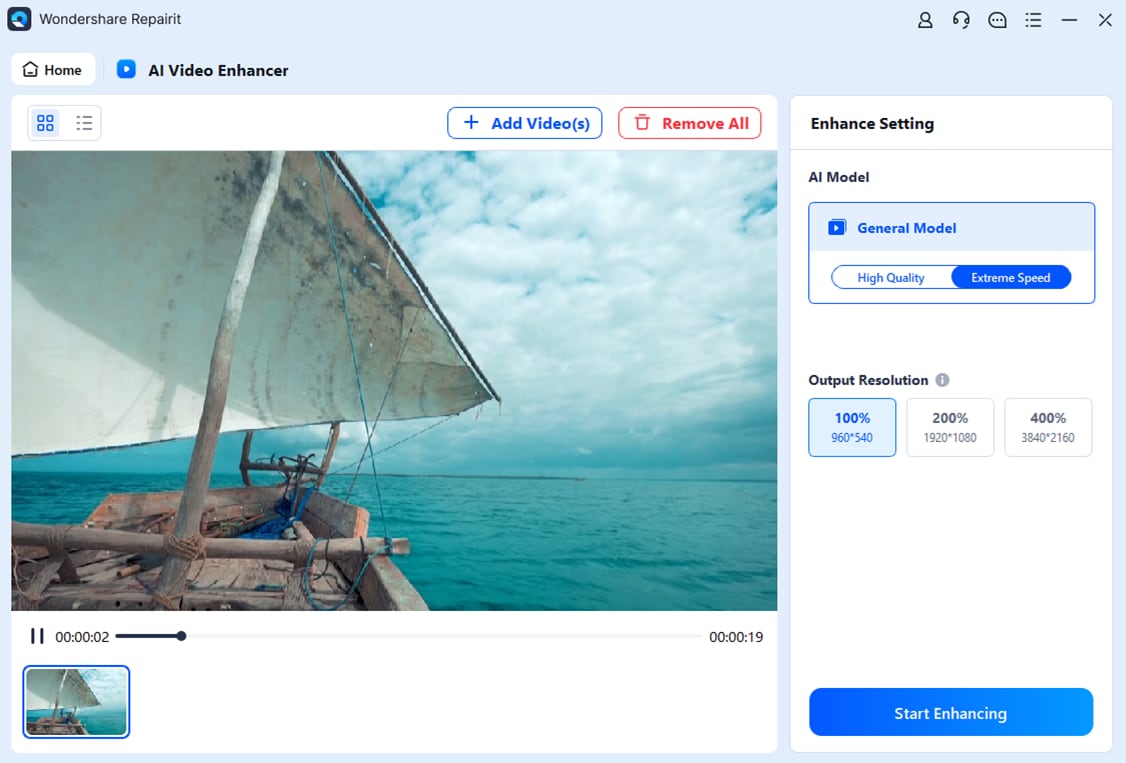
Step 2. Start the Process
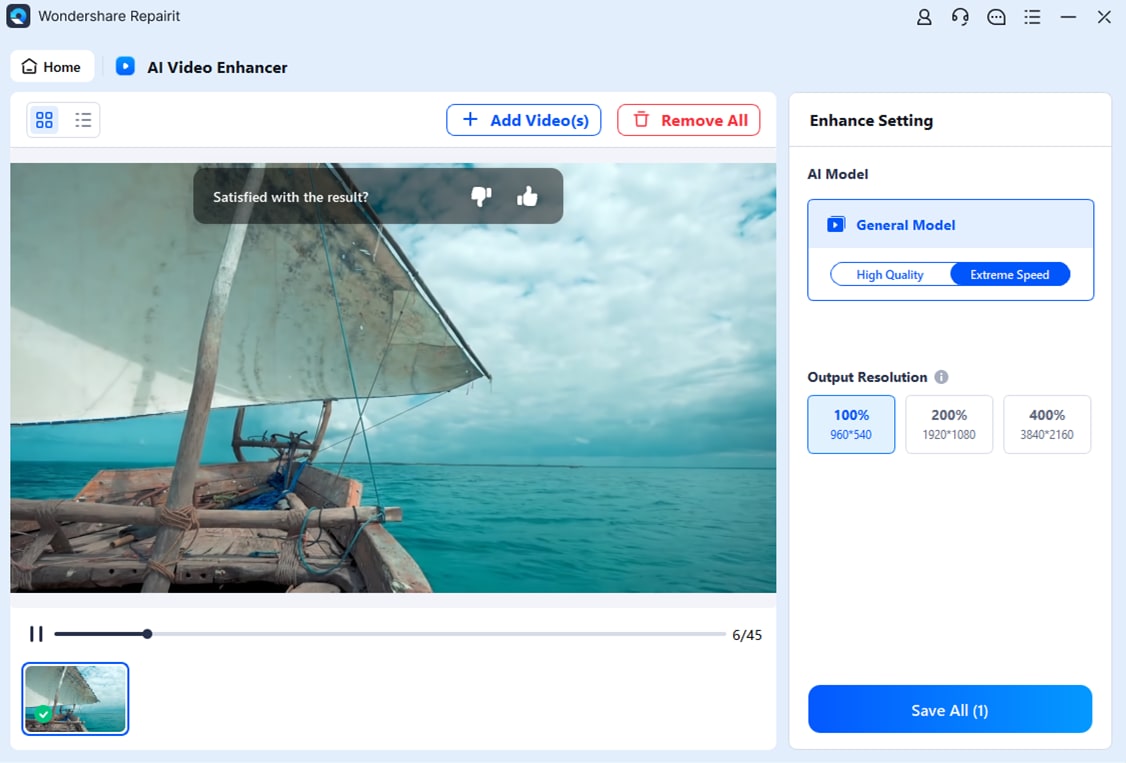
Step 3. Save the AI enhanced videos
Conclusion
While AZMovies gained attention for quick free streams, it also brings legal, security, and stability risks that many viewers want to avoid. By switching to reputable platforms like Tubi, Pluto TV, Crackle, Peacock, The Roku Channel, or Plex, you get safer access to movies with better apps, fewer technical headaches, and more reliable HD streaming.
If you already downloaded movies from AZMovies or other sources and the quality is not great, you can still improve them with AI tools like Repairit Video Enhancer. Pairing safer streaming alternatives with high-quality offline copies gives you a smoother, more enjoyable movie-watching experience on any device.
FAQ
-
Is AZMovies safe to use?
AZMovies operates in a legal gray area and often uses third-party streaming links, which can expose you to intrusive ads, tracking, and potential malware, so official legal movie streaming sites are generally safer. -
What are the best legal AZMovies alternatives?
Popular legal azmovies alternatives include Tubi, Pluto TV, Crackle, Peacock, The Roku Channel, and Plex, all of which rely on licensed content and official apps. -
Do AZMovies alternatives cost money?
Many sites like azmovies such as Tubi, Pluto TV, Crackle, and The Roku Channel are free with ads, while services like Peacock and Plex use a freemium model with optional paid upgrades.