
 TL;DR:
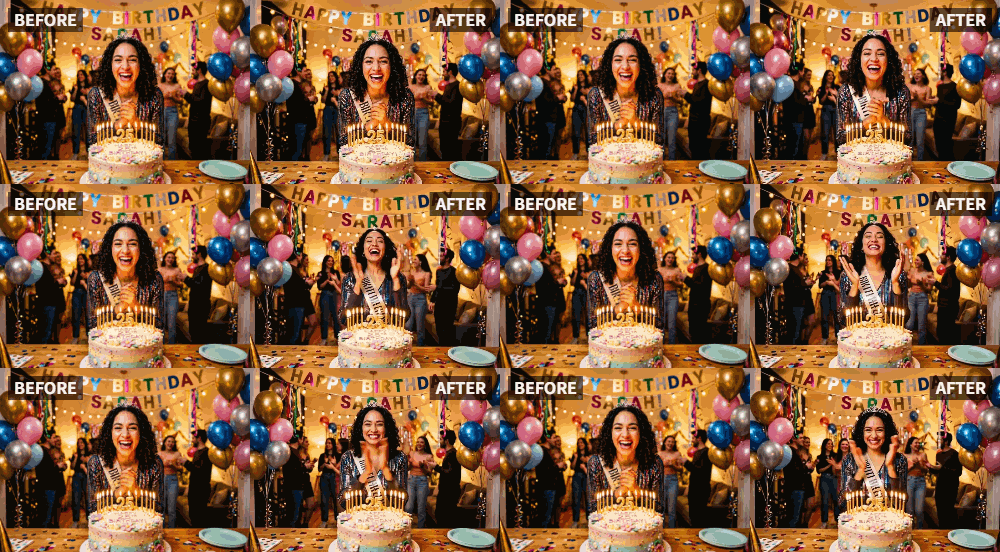
Transform static year-end photos into dynamic video clips for energetic New Year's Eve retrospectives by applying Relumi's "Clap" preset.
● Select 3-5 photos for a quick countdown or 10-15 for a longer review, prioritizing images where subjects are smiling or laughing.
● The AI seamlessly generates the clapping motion even if the people in the original images are holding glasses, noisemakers, or standing against busy confetti backgrounds.
● Relumi exclusively processes visual animations, requiring you to export the generated clips to an external video editor to assemble the montage and add countdown text, music, or cheering sound effects.
Ask AI for a summary
 ChatGPT
 Perplexity
 Gemini
 Claude
 Grok
Grok
New Year's Eve is all about energy, celebration, and the collective joy of a fresh start. You have the photos from past parties—friends laughing, toasting, smiling. But when you go to create that "looking back on the year" video for social media, the photos feel quiet. They don't capture the build-up to midnight, the cheer when the ball drops.
Relumi's "Clap" feature is the perfect tool to inject that New Year's Eve energy into your retrospective videos. By animating photos from the past year to clap and cheer, you create a sense of momentum and celebration that perfectly matches the holiday spirit .
In this article
Part 1: The Problem with Year-End Retrospectives
Every year, as December 31st approaches, people flock to forums and social media for ideas on creative year-in-review posts. The common challenge is making a slideshow of photos feel dynamic and celebratory, not just like a digital photo album.
Static photos can make a retrospective feel flat, especially when the theme is celebration. The desire is to make the people in those photos seem as excited about the new year as you are . By using AI to animate key moments, you can transform your review from a passive viewing experience into an active celebration.
Part 2: How to Create an Animated New Year's Eve Countdown


Relumi AI Photo Animation
Bring old photos to life with AI-powered animation.

 Preset motion styles — Wave, Dance, Clap, Cheers & more
-
Works on old, faded, and black-and-white photos
-
No editing skills required — generate in seconds
-
One tap turns any still image into a moving memory.
Here's how to use Relumi to build a countdown video that crackles with energy.
Step 1: Curate Your Best Photos from the Year
Go through your camera roll and select 5-10 of your favorite photos from the past year. Choose a mix of group shots and individual portraits where people are smiling or laughing. These will be your "cast of characters" welcoming the new year.

Step 2: Animate Key Photos with the "Clap" Preset
Upload each selected photo to Relumi and apply the "Clap" preset. You'll now have a collection of short video clips where your friends and family appear to be applauding. Think of these as your "reaction shots" for the countdown.

Step 3: Assemble Your Countdown Video
Use a simple video editor to bring it all together.
- The Countdown: Start with a classic "10, 9, 8..." countdown text on the screen.
- The Reaction: As you hit "1" or "Happy New Year!", cut to a montage of your animated clapping photos. Layer them one after another or create a split-screen effect.
- Add Sound: This is crucial. Overlay a cheering crowd sound effect or a classic New Year's Eve song to complete the atmosphere .

Part 3: Creative New Year's Applications for the Clap Feature
The "Clap" feature can be used in many ways to enhance your New Year's content.
- Animated New Year's Cards: Instead of a static family photo for your digital New Year's card, send an animated version where everyone in the photo is clapping and cheering. It's a much warmer and more memorable greeting.
- Instagram Story Countdown: In the days leading up to New Year's, post an animated clapping photo each day as a way of saying, "Getting excited for the big day!"
- Resolution Support Group: If you have a group chat with friends who are making resolutions together, create an animated clapping photo of yourself to drop in the chat whenever someone reports a success. It's a fun, personalized way to cheer each other on.
Conclusion
Don't let your New Year's Eve celebration be remembered in silence. Use Relumi's "Clap" feature to bring the people in your photos to life, turning them into a cheering audience ready to welcome the new year. It's the perfect way to look back on the past with joy and look forward to the future with excitement.
Frequently Asked Questions
-
Can I animate a photo where people are holding glasses or noisemakers?
Absolutely. The AI will work with the available visual information. The clapping motion will integrate naturally, even if hands are partially occupied, often adding to the festive feel. -
How many photos should I animate for a good video?
For a short, punchy countdown video, animating 3-5 photos is plenty. For a longer retrospective, you can animate 10-15 and intersperse them with other static images or video clips. -
Can I add text like "Happy New Year" directly in Relumi?
Relumi focuses on animation. It's best to add text overlays, stickers, and music using your phone's built-in editing tools or a dedicated video editing app after you've exported the animated clips. -
Does the animation work on photos from a New Year's party with confetti and decorations?
Yes, those are the perfect photos to use! The AI will animate the people, and the festive background will only add to the celebratory feel of the final video.



