
 TL;DR:
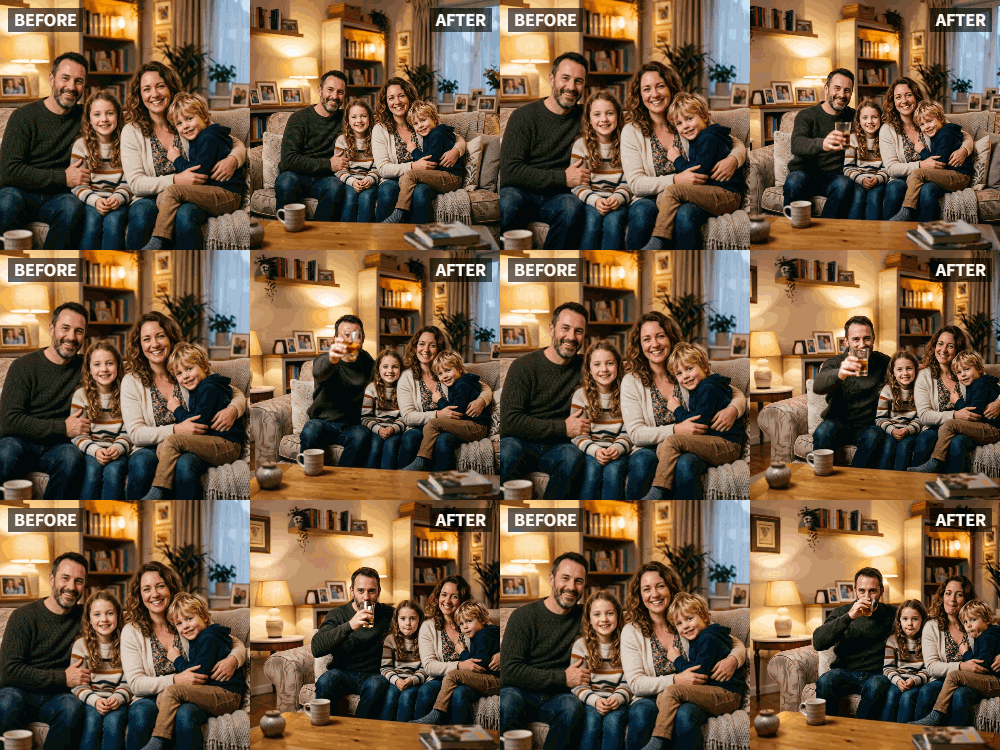
Relumi's AI-powered "Cheers" preset allows you to convert static holiday photos into animated videos of people making synchronized toasting gestures.
● The feature requires photos of human subjects to function optimally and is trained to recognize various drinking vessels, including coffee mugs and juice glasses.
● The "Cheers" effect is not suitable for inanimate subjects like empty table settings, for which the app's "Wave" preset is recommended to create subtle movement.
● Generating the animations can be done using the monthly credits included in Relumi's free tier, but adding text overlays or holiday music requires exporting the clip to a separate video editor.
Ask AI for a summary
 ChatGPT
 Perplexity
 Gemini
 Claude
 Grok
Grok
The holidays are a time for gathering, for toasting, for celebrating with loved ones. You have the photos—the family around the dinner table, glasses raised, smiles all around. You want to share that warmth with friends and family who couldn't be there, but a static photo feels like it's missing the heart of the moment.
Relumi's "Cheers" feature is the perfect way to bring your holiday photos to life. Animate that Christmas dinner photo and watch as your whole family raises their glasses in a warm, unified toast. It's the next best thing to being there.
In this article
Part 1: Sharing Holiday Warmth, Not Just Holiday Photos
During the holiday season, social media is flooded with photos of family gatherings, festive dinners, and smiling faces. They're lovely, but they're also static. They show us the scene, but they don't make us feel the warmth of being there .
The desire is to share not just the image, but the feeling of the holiday—the cheer, the laughter, the love. An animated "cheers" video does exactly that. It takes a standard holiday photo and injects it with the energy of the moment, making viewers feel like they're part of the celebration, even from far away.
Part 2: How to Create an Animated Holiday Cheers Video


Relumi AI Photo Animation
Bring old photos to life with AI-powered animation.

 Preset motion styles — Wave, Dance, Clap, Cheers & more
-
Works on old, faded, and black-and-white photos
-
No editing skills required — generate in seconds
-
One tap turns any still image into a moving memory.
Creating a heartwarming holiday greeting is simple with Relumi.
Step 1: Choose Your Best Holiday Photo
Select a clear photo from your holiday gathering. A shot of the family around the dinner table, raising their glasses for a toast, is perfect. A group shot of friends at a New Year's party works just as well.

Step 2: Upload to Relumi and Apply the "Cheers" Preset
Open the Relumi app, go to Photo Animation, and select the "Cheers" preset. The AI will bring the photo to life, animating everyone in a synchronized, joyful toast.

Step 3: Share Your Living Holiday Greeting
Export the clip and share it with the world.
- Digital Holiday Cards: Send the animated video as a digital holiday card to friends and family via email or text.
- Social Media Post: Share it on your feed with a warm holiday message. It will stand out among the static photos.
- Video Montages: Include the animated toast in a longer holiday recap video set to festive music .

Part 3: Creative Holiday Uses for the Cheers Feature
This idea can be adapted for many holiday moments.
- Thanksgiving Toast: Animate a photo of the family raising their glasses before the Thanksgiving meal.
- Christmas Morning Cheers: If your family has a tradition of a morning toast (with coffee or juice), animate that photo.
- New Year's Eve Countdown: Use the "Cheers" feature on your best NYE party photo for a timely, engaging post.
- Hanukkah Celebrations: Animate a photo of the family lighting the menorah and raising a glass to celebrate the Festival of Lights.
- "Missing You" Messages: For family members who couldn't be at the gathering, send them an animated cheers video with a message: "Wishing you were here to toast with us!"
Conclusion
The holidays are about connection, warmth, and celebration. By using Relumi's "Cheers" feature to animate your favorite holiday photos, you can share that feeling with everyone you love, no matter how far away they are. Turn your memories into living greetings that spread joy all season long.
Frequently Asked Questions
-
Will the cheers animation work if people are holding coffee mugs or juice glasses?
Yes! The AI is trained on all kinds of drinking vessels. The important thing is the gesture of raising and toasting. -
Can I animate a photo of just the holiday table setting?
The "Cheers" feature is optimized for people. For a table setting, the "Wave" preset might create a nice, subtle movement. -
How can I make the video feel more like a holiday card?
After exporting, use a simple video editor to add text overlays like "Merry Christmas" or "Happy Holidays," and add classic holiday music. -
Is the free version enough to animate several holiday photos?
Yes. Relumi's free tier provides enough monthly credits to animate key photos from your holiday celebrations.



