
 TL;DR:
You can bypass the facial distortion and paywalls of generic animation apps by using Relumi's AI Animate Photo feature, which applies intent-specific motion presets to convert any still image into a loopable video for Instagram Reels or Stories.
● The system avoids unnatural rendering by matching distinct movement styles to specific subjects, utilizing the Dance preset for portraits and pets, and the subtle motion of the Wave preset to mask the lower resolution of scanned vintage prints.
● Generating a clip requires a device running iOS 15+ or Android, consumes one AI credit per preview attempt, and achieves the cleanest output on well-lit, single-subject photos with natural depth separation.
● Because the animation engine relies on existing visual data, users working with dark, heavily filtered, or damaged images must first process the file through the Relumi Photo Enhancer or Photo Restore tools to prevent inconsistent results.
Ask AI for a summary
 ChatGPT
 Perplexity
 Gemini
 Claude
 Grok
Grok
That comment has a hundred people searching alongside it. No long explanation needed — just someone who wants their photos to move on Instagram and can't find a tool that actually delivers. If you've been in the same position, you already know what comes next: a dozen apps tried, a handful of blurry outputs, and one last free trial that locks the result behind a paywall the moment you're about to save.
Making moving pictures for Instagram has never been more important — and never been more confusing. Reels, Stories, animated posts — they all perform better than static images in the feed. The algorithm rewards motion. Audiences stop scrolling for it. But the gap between wanting to animate a photo and actually getting a clean, shareable result is real, and most tools make it worse, not better.
This guide walks you through exactly how to make a photo move on Instagram — starting with why most methods fail, then showing you step-by-step how to do it right using Relumi's AI Animate Photo feature. One tap. Any photo. A scroll-stopping clip ready to post.
In this article
Part 1: Why Making Photos Move on Instagram Is Harder Than It Looks — And Why Most Tools Fail
The concept sounds simple: take a still photo, make it move, post it to Instagram. In practice, every step of that sentence hides a problem. Head to Reddit or Quora and search for "how to make moving pictures for Instagram" — what you'll find isn't a clean answer. It's thread after thread of frustrated creators who tried something, got a bad result, and are now asking again.
Before diving into the solution, it helps to understand your options. When people talk about "moving pictures" on Instagram, they usually mean one of four things — and most of them come with serious trade-offs:
Boomerang is Instagram's native looping format. Fun for quick moments, but it only works on video you shoot in the moment. You can't turn an existing still photo into a Boomerang. Live Photos (iPhone) capture a short clip before and after the shutter — but again, only for photos taken live. You can't go back and add motion to an old shot. Cinemagraphs look stunning but require a video camera, a tripod, and a skilled editor who knows how to mask and loop specific layers — not realistic for everyday creators. That leaves AI photo animation as the only method that actually works on any still image, past or present, without technical skills or a video recording.
The appeal of AI-powered photo animation is obvious. The execution of most apps, however, is a different story:
Distorted faces are the most common complaint. Generic AI motion models don't understand facial anatomy. The result is a photo where the eyes drift sideways, the mouth warps, or the skin texture ripples unnaturally — the opposite of what you wanted. Even when the motion is technically smooth, it doesn't look like the person in the photo anymore.
Then there's the paywall problem. Apps that advertise "free" animation lock the export behind a subscription at the exact moment you've already spent time generating the result. This is one of the most consistently complained-about patterns across Reddit's photo and creator communities — and it poisons the experience even when the output is good.
Beyond distortion and paywalls, the manual alternatives — Photoshop, After Effects, Blender — are simply too steep for anyone who just wants to post a Reel. Learning rigging, keyframes, and puppet tools takes days. For everyday Instagram content creators, that's not a realistic path.
The gap — between wanting to turn a photo into a moving video for Instagram and finding a tool that works cleanly without tricks — is the exact problem Relumi's AI Animate Photo is built to solve.
Part 2: How Relumi AI Animate Photo Works — And How to Use It Step by Step


Relumi — AI Animate Photo
Photo Animation — Turn Any Still Image Into a Shareable Moving Clip in One Tap

 Preset motion styles: Wave, Dance, Clap, Cheers, and more — each style is tuned for a specific type of natural movement. Choose the one that fits your photo's mood and the output looks intentional, not randomly generated. Dance works especially well on people and pets.
-
One-tap photo to video: Upload any still image, pick a motion style, and generate a short shareable clip in seconds. No editing timeline. No keyframes. No software to learn. The entire process from import to saved video takes under a minute.
-
Works on any photo: New selfies, old family portraits, travel shots, pet photos, scanned vintage prints — the AI handles all photo types and quality levels. Output is a loopable video file ready to post as an Instagram Reel, Story, or video post.
Relumi's AI Animate Photo feature works differently from generic animation tools because it doesn't apply a one-size-fits-all motion pass to your image. Instead, you choose from a set of preset motion styles — each one engineered for a specific feel. Wave produces a gentle, natural sway. Dance generates rhythmic full-body movement. Clap and Cheers deliver celebratory motion for party shots and milestones. Because the motion style matches the intent of the photo, the result looks deliberate rather than glitchy — and critically, faces stay recognizable.
How to Make Moving Pictures for Instagram Using Relumi — Step by Step
Step 1. Download Relumi & Open the Animation Tool
Download Relumi free from the App Store (iOS 15+) or Google Play. Open the app — you'll see the main feature menu on the home screen. Tap Animation (also labeled Photo to Video in some versions) to enter the AI Animate Photo tool.

Step 2. Upload Your Photo
Tap the upload area inside the Animation tool and import any photo from your camera roll. This can be a fresh selfie, an old family portrait, a vacation snapshot, or a pet photo — any image format, any quality level. Relumi accepts photos you took yesterday as easily as scanned prints from decades ago. For best results, use a well-lit photo with a clearly visible subject.

Step 3. Choose a Motion Style Preset
After uploading your photo, select a motion style from the preset menu. Each preset is tuned for a different type of natural movement:
- Wave — Gentle, swaying motion. Best for outdoor, nature, travel, and beach photos.
- Dance — Rhythmic full-body movement. Works on people and pets. Most popular preset.
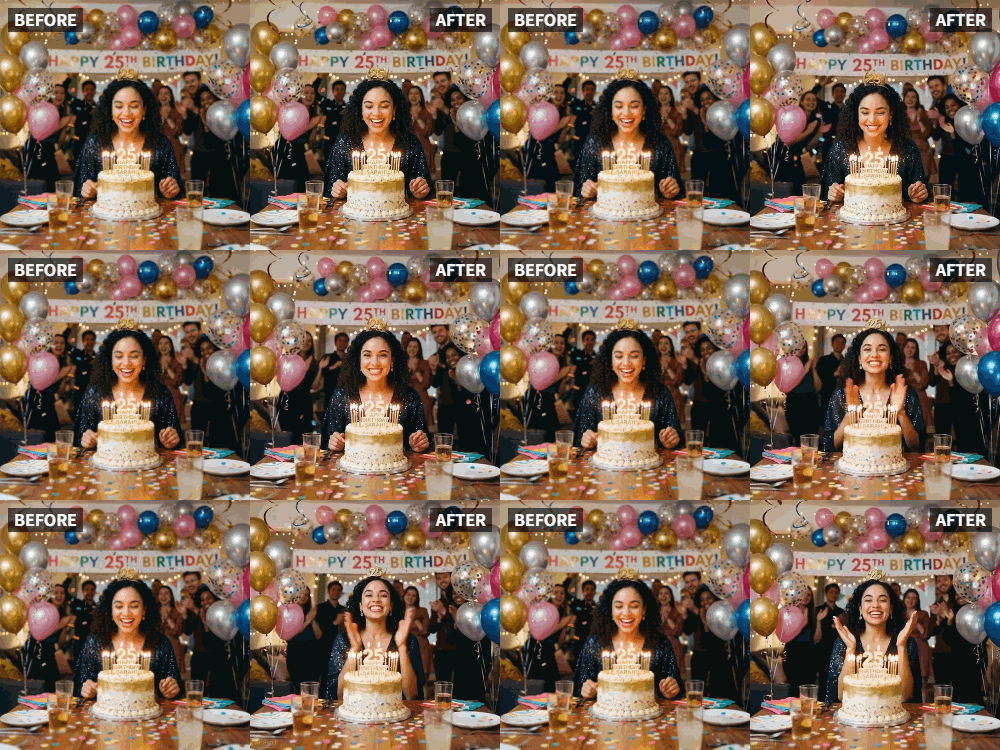
- Clap — Celebratory motion. Perfect for birthdays, graduations, and milestone shots.
- Cheers — Raising-glasses animation. Ideal for party photos and celebration moments.
Not sure which to pick? Start with Dance — it produces a satisfying result on almost any portrait photo and looks especially great on people and animals.
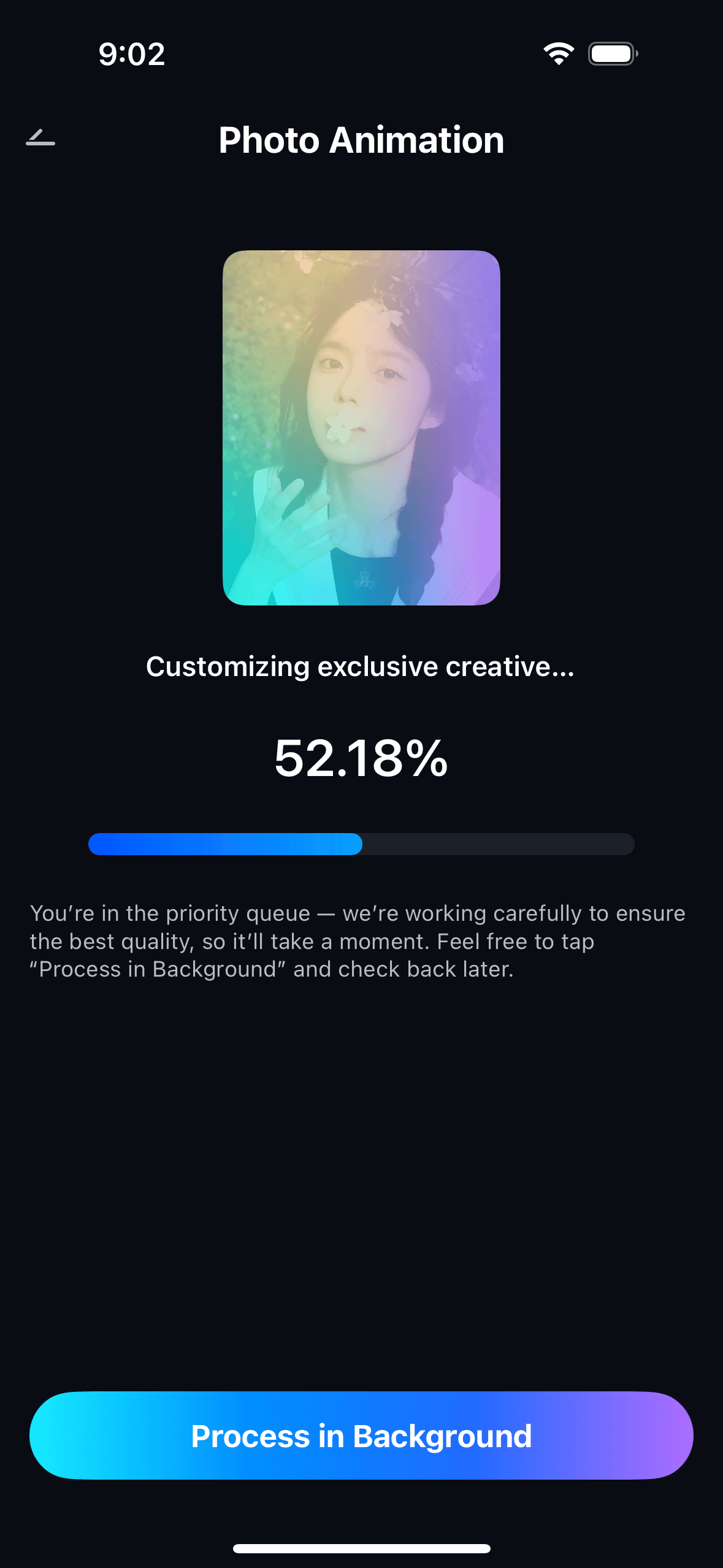
Step 4. Generate, Preview & Save Your Animated Photo Clip
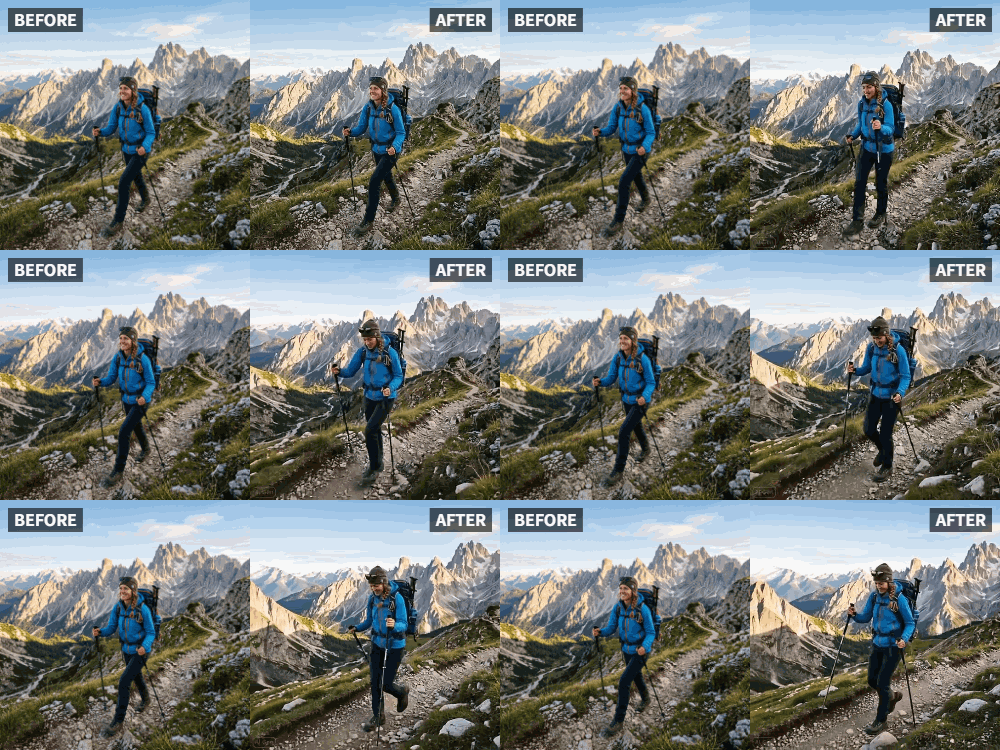
Tap Generate and let Relumi's AI engine create the motion. Within seconds you'll see a preview of your animated photo. Use the before-and-after toggle to compare the original still against the moving clip. If you want to try a different style, tap another preset and regenerate — each attempt takes only a few seconds and uses one AI credit. Once you're happy with the result, tap Save to export the clip to your camera roll as a video file.

From your camera roll, post the clip directly to Instagram as a Reel (where it will loop automatically), an Instagram Story, or a standard video post. The output format is fully compatible with all three — no additional conversion or editing required. Add trending audio when posting as a Reel for maximum reach.
Part 3: Three Ways People Are Actually Using AI Animate Photo on Instagram
AI photo animation isn't one use case. The same feature gets used for very different reasons by very different creators — and the emotional value behind each is different enough to walk through them separately.
🤳 1. Selfies & Portrait Photos — Stop the Scroll
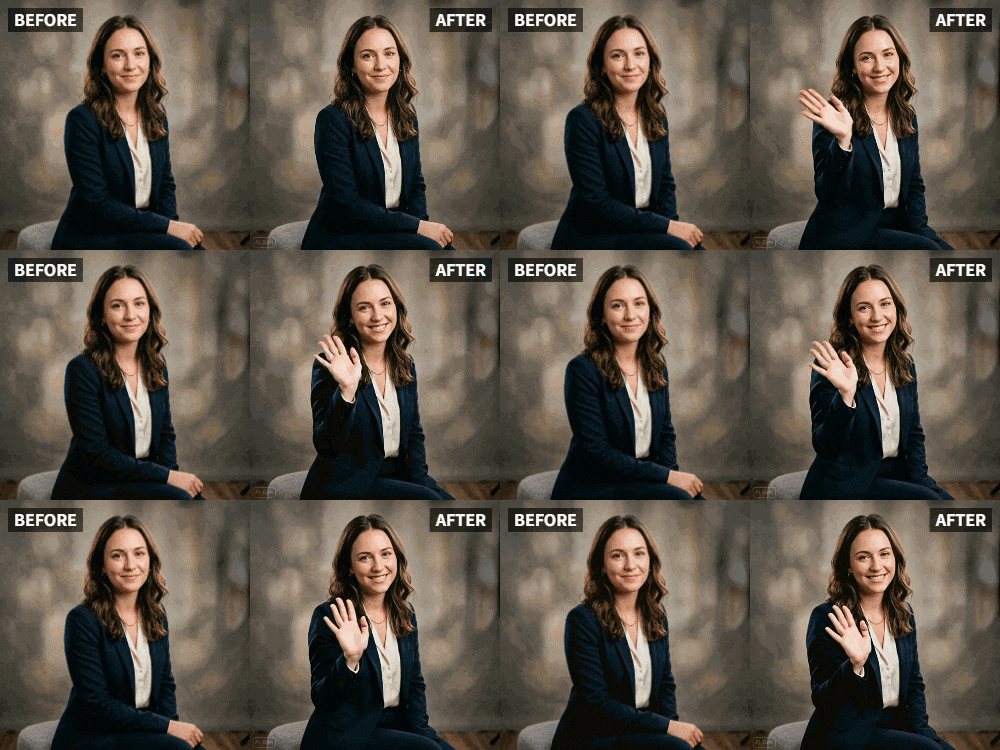
This is the most common use case — and the one where moving pictures have the most direct impact on Instagram engagement. A static portrait competes with hundreds of other static portraits. An animated portrait where the subject moves naturally stops the scroll instantly because it feels alive in a way a still photo never can.
The Dance preset is purpose-built for portrait photos. Upload a selfie, apply Dance, and the AI generates a short clip where the subject moves to a natural rhythm. It works especially well on mid-action shots — someone laughing, caught mid-wave, leaning in for a hug — because the AI has more visual energy to work with. Pair the exported clip with trending audio when posting as a Reel, and you hit both the visual and auditory scroll-stop triggers at once.
Content creators who post animated selfies consistently report higher engagement rates than with their static portrait posts — more saves, more shares, and more DMs asking "what app did you use?" The format is genuinely novel enough that it still stands out, but accessible enough to produce in under a minute.
👵 2. Old Family Photos — Bring Memories Back to Life
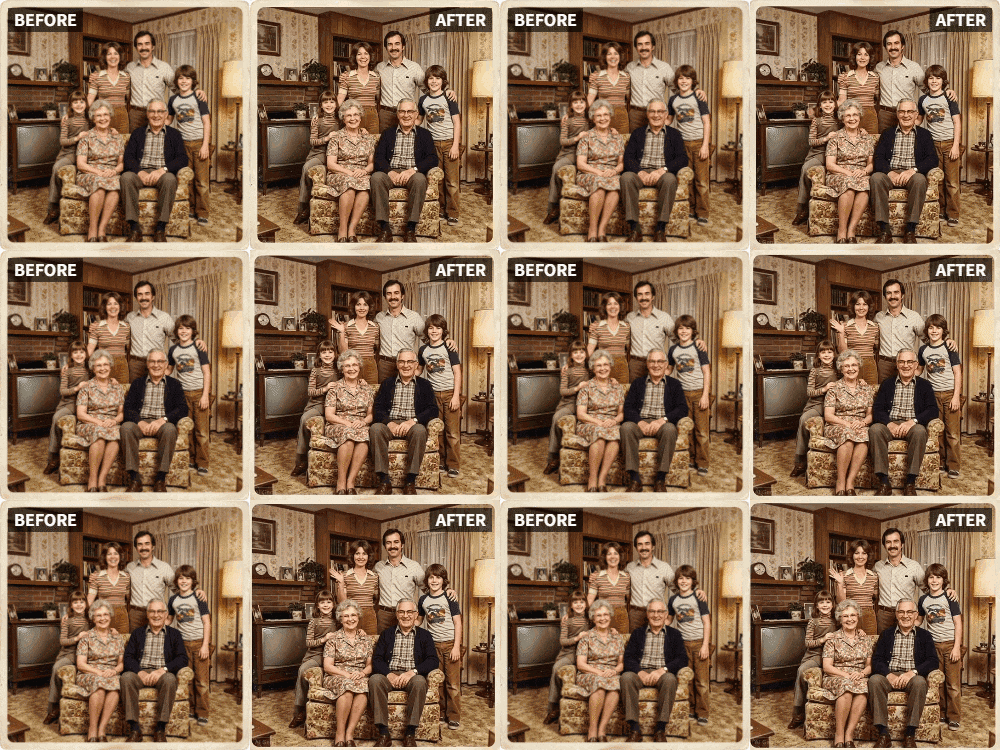
This is the use case that surprises people most — and the one with the deepest emotional resonance. Watching a black-and-white family portrait from decades ago gently animate is genuinely moving. It bridges generations in a way that even high-resolution restoration can't fully achieve on its own.
Relumi handles old photos and scanned vintage prints without requiring a high-quality source image — which is the key difference from most animation tools. The AI works from whatever visual information is present in the photo, and the Wave preset tends to produce the most natural results on older images because the motion is subtle enough not to reveal the lower resolution.
The most effective way to use this on Instagram: pair the animated photo with a short caption about the person or moment in the photo. Content that combines visual nostalgia with a personal story consistently drives strong engagement — comments, shares, and saves — because it triggers memory and emotion in the audience as well as the poster. Relumi's all-in-one workflow makes this easier: restore the old photo first to repair fading and scratches, then animate it in the same app before posting.
🐾 3. Pets, Travel & Celebrations — Every Shot Deserves Motion
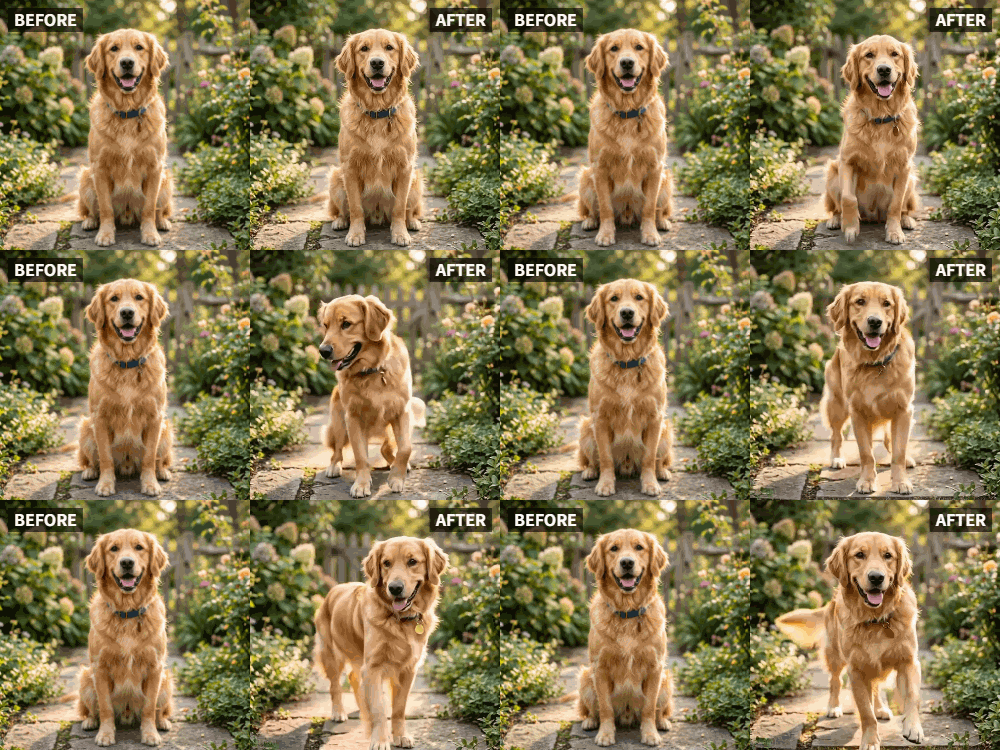
Animals are already Instagram gold. An animated dog "dancing" or a cat "waving" is viral content waiting to happen. Relumi's AI handles fur texture and animal features reliably — especially with the Dance and Wave presets, which generate motion that feels natural to the subject rather than forcing a human movement pattern onto an animal's body.
Travel and landscape photos are equally rewarding to animate. That shot from your last beach trip or mountain hike? The Wave preset makes the scene breathe — the trees seem to sway, the water appears to ripple, the atmosphere shifts from a frozen moment to a living environment. A beautiful static photo becomes something immersive.
For celebrations — birthdays, graduations, anniversaries — the Clap and Cheers presets were made specifically for these moments. Instead of posting a static "Happy Birthday" photo where everyone is frozen mid-smile, you post one where they look like they're actually celebrating. The format is also perfect for holiday content: Christmas cards, New Year posts, and seasonal photos all benefit from subtle motion that makes them feel warm and alive rather than just posted and forgotten.
Conclusion
The desire to make photos move on Instagram has been there since the day Reels launched. The tools to do it well haven't kept up. Boomerang only works for new shots. Live Photos require an iPhone and a live recording. Cinemagraphs need professional video equipment. Generic AI apps distort faces, charge after you've already generated the result, or produce motion that looks more like a software glitch than a natural animation.
Relumi's AI Animate Photo solves the actual problem. It applies preset motion styles tuned for specific types of natural movement — Wave, Dance, Clap, Cheers — to any still image you upload. The output looks intentional and smooth because the motion style matches the intent of the photo, not a random AI guess. The result is a loopable video clip that posts directly to Instagram as a Reel, Story, or video post, with no additional steps and no paywall at the last moment.
Whether you're a content creator who needs animated posts that stop the scroll, someone who wants to bring an old family photo back to life, or just a person with a great pet photo that deserves more than a static grid square — the free tier on iOS and Android covers everything you need. Download Relumi. Open Animation. Upload your photo. Pick a motion style. Save the clip. Post it.
FAQ
-
Can I make moving pictures for Instagram from old or low-quality photos?
Yes. Relumi's AI Animate Photo feature works on any photo, including scanned vintage prints, low-resolution images, old family portraits, and archive photos. The AI doesn't require a high-quality source image. For best results on old or damaged photos, run the image through Relumi's Photo Restore tool first to repair fading, scratches, and blur — then animate. -
Do I need any video editing experience to use Relumi?
None at all. Relumi's Photo Animation tool is designed for people with zero video editing background. You choose a preset motion style, tap Generate, and the AI handles everything. There are no timelines, no keyframes, and no software to learn. The entire process from photo upload to saved video clip takes under a minute. -
Will the animated clip work as an Instagram Reel?
Yes. Relumi exports the animated photo as a standard video file that you can post directly as an Instagram Reel, Instagram Story, or regular Instagram video post. The output loops naturally — exactly the format the Instagram algorithm rewards with broader reach. Add trending audio when posting as a Reel for the best performance. -
Why do most AI photo animation apps produce distorted or unnatural results?
Most generic AI animation tools apply a single undifferentiated motion pass to the entire image without understanding the subject — which is why faces end up drifting, eyes look wrong, and the result feels more like a glitch than a natural animation. Relumi avoids this by using preset motion styles that are tuned for specific types of movement. The animation feels intentional because it's matched to the content of the photo, not randomly generated. -
Does animating a photo affect the original image?
No. Relumi generates a new video file and keeps your original photo completely intact in your camera roll. The animation is a separate output — your source image is never modified or overwritten. You can animate the same photo with different motion styles and compare results without any risk to the original. -
What types of photos work best for AI photo animation?
Clear, well-lit photos with a single main subject tend to produce the cleanest results. Portrait mode photos work especially well because the subject has natural depth separation from the background. Photos where the subject is mid-action — laughing, jumping, at a party — animate particularly well because the AI has more visual energy to work with. Very dark, heavily filtered, or extremely blurry photos may produce less consistent results — in those cases, use Relumi's Photo Enhancer first before animating. -
Is Relumi AI Animate Photo free to use?
Relumi is free to download on the App Store and Google Play with a free tier that includes access to the Animation feature. Additional AI credits are available for purchase if you plan to animate a large number of photos. There's no paywall that activates at the final step — unlike many competing tools that charge only after you've already generated the result.



